All the features. One platform.
- All-in-one instead of tool chaos
- End-to-end encryption
- Made & hosted in Germany
Try it for free now
The essentials at a glance
- All-in-one beats tool chaos: Project management platforms that combine tasks, communication, and file storage save time, reduce friction, and lower software licensing costs.
- Data privacy is a deal-breaker: GDPR compliance, European server hosting, and end-to-end encryption are mandatory in many industries.
- Usability drives adoption: Even the best project management software is useless if your team doesn’t use it. Ease of use beats feature overload.
- Consider total cost of ownership: Seemingly affordable standalone tools become expensive once you factor in additional tools for chat, video conferencing, and file storage.
- Stackfield as a secure German solution: An all-in-one platform with true end-to-end encryption, ISO 27001 certification, BSI C5 attestation, and German-based hosting.
Five open tabs, three email threads, an Excel sheet with outdated deadlines, and a team chat where no one knows where the latest version is. Sound familiar? This kind of chaos is what team leads deal with every day when tasks, communication, and files are scattered across too many tools. At Stackfield, we know this challenge – and we’ve analyzed the market for you. In this comparison of project management tools, you’ll find the best software solutions to help you make the right choice for your team.
Why use project management software?
Modern work is complex: distributed teams collaborate across locations, multiple projects run in parallel, and the demand for transparency and accountability continues to grow. Without a centralized project management platform, even experienced project managers can quickly lose track of responsibilities, dependencies, and deadlines.
To-do lists, email inboxes, and Excel spreadsheets quickly reach their limits. These tools weren’t built for cross-team digital collaboration. They lack real-time visibility, automated notifications, and the ability to map task dependencies. This is exactly the gap that professional project management tools are designed to fill.
What types of project management tools are there?
Before comparing individual software solutions, it’s worth understanding the three main categories of PM tools. Not every tool offers the same functionality – and the lines between these categories are increasingly blurred as providers continue to expand their feature sets.
| Type |
Core features |
Example tools |
Typical limitation |
| Task & project management |
Gantt charts, Kanban boards, milestones, dependenciestd>
| Asana, Monday.com, Trello |
No built-in communication or file storage |
| Collaboration & communication |
Team chat, video conferencing, file storage, co-editing |
Slack, Microsoft Teams |
No true project management capabilities |
| All-in-one solution |
Project management + communication + file storage + time tracking |
Stackfield |
Slightly steeper learning curve due to broader functionality |
Task & project management tools
Traditional project management tools focus on the structured planning and execution of projects. Typical features include Gantt charts, Kanban boards, task lists, milestones, and task dependencies. Well-known examples in this category are Asana, Monday.com, and Trello. Their main strength lies in clear project structuring and the ability to map even complex projects with many team members in a transparent way. The downside: communication and file storage are usually missing. As a result, teams need additional tools like Slack or Dropbox – leading to fragmented workflows and higher overall costs.
Collaboration & communication tools
On the other hand, there are tools designed primarily for team communication and collaboration. These include team chat, video conferencing, file storage, and collaborative document editing. Slack and Microsoft Teams are the most prominent examples.
Their strength is fast, seamless real-time communication. However, they lack true project management capabilities: no Gantt charts, no task dependencies, and no structured project planning. If you need to manage complex, multi-layered projects, pure collaboration tools quickly reach their limits – requiring additional PM software.
All-in-one solutions
The third category combines project management and collaboration within a single platform. Instead of juggling five separate logins for different tools, your entire team works in one centralized place. This approach – tool consolidation – is becoming increasingly important, as it reduces friction and lowers the total cost of ownership (TCO). Stackfield, for example, combines task management, team chat, video conferencing, document storage, and time tracking in one platform, developed and hosted in Germany. For companies looking to eliminate tool sprawl while ensuring strong data protection, a
all-in-one solutions are often the best choice.
Looking for an all-in-one solution? Stackfield combines project management, team chat, video conferencing, and document storage in a single platform – secure, GDPR-compliant, and made in Germany.
Try it for free now
Project management tools: what to look for when choosing?
Project management tools are easy to find – there are countless options out there, all packed with features. But choosing the right one doesn’t start with comparing feature lists. It starts with an honest assessment: what does your team actually need?
The following six criteria will help you narrow down your options systematically and avoid costly mistakes.
- Features & customization: Does your team need Gantt charts for complex projects, Kanban boards for agile workflows, or built-in time tracking? What matters isn’t which tool has the most features, but which one has the right ones. Too many advanced features can overwhelm users and reduce adoption. Focus on what your team actually uses day to day. At a minimum, any project management tool should cover three core areas: task management, communication, and document / file management.
- Ease of use: Usability determines whether your team adopts the tool or goes back to email and spreadsheets after two weeks. A steep learning curve leads to low usage. Look for fast onboarding, a clean interface, and intuitive navigation. When in doubt, simplicity beats feature overload.
- Data privacy & compliance: For companies in regulated industries, GDPR compliance isn’t optional – it’s essential. Check server location, encryption standards, and certifications like ISO 27001 or BSI C5. Also consider the implications of the U.S. CLOUD Act: under certain legal conditions, U.S. authorities may require U.S. companies to provide access to their data, even if this data is stored outside the U.S. Stackfield is currently the only German all-in-one solution offering true end-to-end encryption, ISO 27001 certification, and BSI C5 attestation.
- Support & onboarding: Especially when introducing new project management software, hands-on support is invaluable. Many U.S. tools don’t offer German-language phone support and instead rely on self-service models like knowledge bases and community forums. If your team needs fast answers in German, phone support should be a key selection criterion.
- Pricing & total cost of ownership: The price of "free" project management software only tells half the story. Consider the total cost: do you also need a chat tool, a video conferencing solution, and file storage? All-in-one tools may seem more expensive at first glance, but are often more cost-effective than combining four or five separate tools.
- Integrations: Your project management tool should integrate seamlessly with existing systems like ERP, CRM, or email. Check API availability and existing integrations. Important: integrations should simplify your workflows—not create new dependencies on additional vendors.
Expert tip: Projects are like fingerprints – each one is unique. To find the solution that truly fits your team, create a checklist of your top five priorities before testing tools. This helps you avoid being distracted by long feature lists and enables you to make a well-informed decision.
The 8 best project management tools compared
We have analyzed the eight most relevant project management tools and evaluated them based on features, data privacy, usability, and value for money. The comparison table below gives you a quick overview of the market. Further down, you’ll find detailed profiles of each tool—including strengths, limitations, and pricing to give you deeper insights into the best project management software solutions.
| Tool |
Type |
Server location |
End-to-end encryption |
Phone support |
Free version |
Price from (per user / month) |
Best suited for |
| Stackfield (recommended) |
All-in-One |
Germany |
Yes |
Yes |
14-day trial |
9 Euro |
Public sector, healthcare, finance, data-sensitive organizations |
| Asana |
Project management |
USA |
No |
No |
Yes (up to 2 users) |
11 Euro |
Agile teams, marketing departments, international companies |
| Monday.com |
Project management |
USA |
No |
No |
14-day trial |
9 Euro |
SMEs, marketing teams, quick onboarding |
| ClickUp |
All-in-One |
USA |
No |
No |
Yes (limited) |
7 US-Dollar |
Tech-savvy teams, agencies, startups |
| Trello |
Kanban |
USA |
No |
No |
Yes (up to 10 boards) |
5 US-Dollar |
Small teams, single projects, beginners |
| MS Project & Teams |
Enterprise PM + communication |
USA / EU |
No |
No |
Included in Office bundle (Teams) |
9,40 Euro |
Companies in the Microsoft ecosystem |
| MeisterTask |
Kanban |
Deutschland |
No |
No |
Yes (limited) |
13,50 Euro |
Small agile teams, simple workflows |
| awork |
Project management |
Germany |
No |
No |
No |
5 Euro |
Agencies, creative teams |
Stackfield: The secure all-in-one solution from Germany
Stackfield is a German project management platform that is also fully hosted in Germany. The Munich-based company specializes in data sovereignty. Despite its English name, Stackfield is built and run by a German team. What sets it apart: all data can be protected by true end-to-end encryption. Not even Stackfield itself can access user data. The platform combines project management, team chat, video conferencing, document storage, and time tracking in a single solution, while maintaining the highest data protection standards.
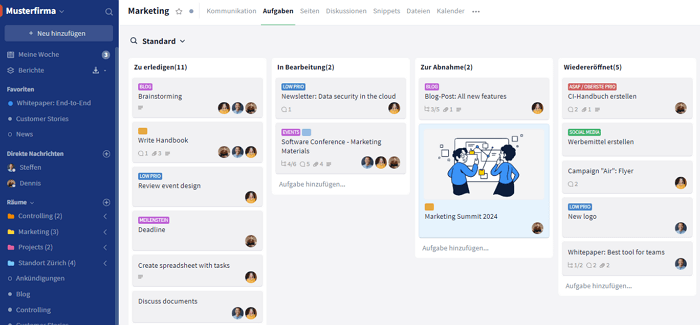
Stackfield brings everything teams need for their daily work—project management, team chat, video conferencing, and document storage into one platform. Within the all-in-one solution, dedicated workspaces can be created for individual projects and flexibly adapted to each team’s needs. Its true end-to-end encryption ensures the highest level of security: not even Stackfield can access user data. ISO 27001 certification and BSI C5 attestation make it a top choice for regulated industries. Personal support in German, hosting in Germany, and an on-premise option complete the offering – backed by more than 10,000 companies and an OMR rating of 4.8 out of 5 stars.
However, there are also some limitations: Stackfield requires a minimum of 5 licenses per organization. And the integrated office suite (Collabora) is not a full replacement for Microsoft Office. For power users working with complex spreadsheets, this may be a trade-off.
Who is it for? Public sector organizations, government agencies, healthcare, finance and insurance, as well as education and research. In short: any organization looking to avoid dependency on U.S. providers and ensure data sovereignty.
Pricing:
| Stackfield plan |
Price per user (billed annually) |
| Starter |
from 9 Euro |
| Business |
from 14 Euro |
| Premium |
from 18 Euro |
| Enterprise |
from 28 Euro |
Billed annually. 14-day free trial available.
Asana: A market leader in project management
Asana is one of the most widely used project management tools worldwide. According to the company, over 80% of Fortune 100 companies use the platform, which was originally founded by former Facebook employees. It is especially popular among agile teams and marketing departments. The software stands out with its modern interface and strong automation capabilities.
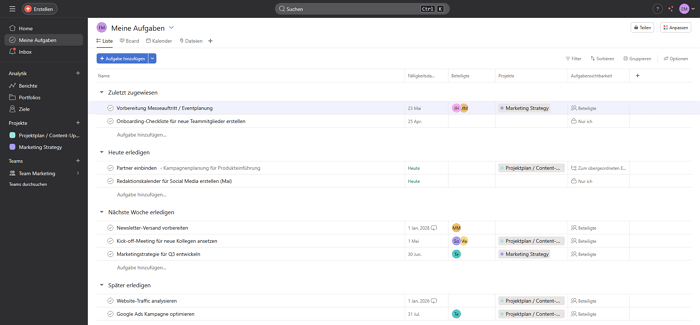
One of Asana’s biggest strengths is its intuitive user interface. Automations and workflows save time on recurring tasks, and its wide range of integrations allows it to fit seamlessly into almost any existing tech stack. AI features (AI Studio) support task prioritization and assignment. In addition, Asana offers multiple views, including list, board, timeline, and calendar.
However, there are some limitations to be aware of: Asana does not offer a native team chat, so communication requires an additional tool like Slack. Its servers are located in the U.S. and subject to the CLOUD Act, which can be a concern for data-sensitive organizations. There is no true end-to-end encryption and no phone support. The free version is limited to 15 users. If you’re looking for a privacy-focused alternative, it’s worth exploring Asana alternatives.
Who is it for? Agile teams, marketing departments, and international companies without strict data protection requirements.
Pricing: Personal plan as a free base version (up to 2 users), Starter from approx. €11 per user / month, Advanced from approx. €24.99 per user / month, and Enterprise pricing available on request. Additional add-ons may increase the total cost.
Monday.com: Visual project management with colorful boards
Monday.com has secured a strong position in the project management market thanks to its highly visual interface. The Israeli provider offers pre-built templates for various industries, enabling a quick start.
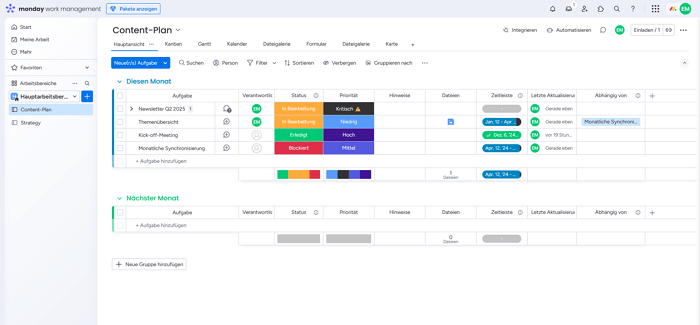
Its strengths lie in customizable dashboards that can be configured via drag-and-drop. Automations help reduce manual, repetitive work, and a broad integration ecosystem connects Monday.com with commonly used tools. It also offers a solid mobile app for working on the go.
On the downside, there are some clear limitations: while Monday.com offers EU-based server locations, it relies on AWS infrastructure. Since AWS is a U.S. provider, this creates a theoretical risk of access under the CLOUD Act – something that may be relevant for data protection. There is no phone support. As complexity increases and multiple projects run simultaneously, the interface can become less clear. Time tracking is not available in all plans. Stackfield can be considered an alternative to Monday.com.
Who is it for? SMEs, marketing teams, and teams looking for a quick setup. Less suitable for data-sensitive industries or complex projects with strict compliance requirements.
Pricing: Free basic version (2 users), Basic from €9 per user / month, Standard from €12 per user / month, Pro from €19 per user / month, and Enterprise pricing available on request, with a general minimum of three users.
ClickUp: Maximum feature depth for power users
ClickUp markets itself as "one app to replace them all." Its feature set is extensive: from Docs and whiteboards to built-in AI capabilities, the platform offers a wide range of tools. However, expectations and reality don’t always align – fully leveraging its capabilities requires time and effort.
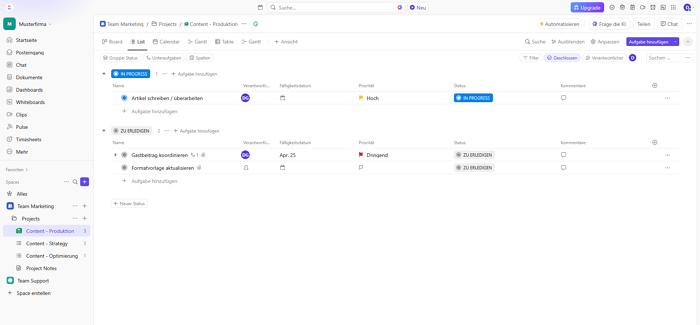
Its strengths are clear: the feature set covers a wide variety of use cases. The software is highly customizable and can be adapted to individual workflows. Built-in AI features assist with task creation and summarization. A free version allows teams to get started without risk. Docs and whiteboards are natively integrated, eliminating the need for additional tools.
That said, there are noticeable drawbacks: ClickUp requires a learning curve, especially for less tech-savvy teams. As a U.S.-based provider, it is subject to the CLOUD Act. There is no true end-to-end encryption. Some users report performance issues in very large workspaces with many parallel projects and team members. For privacy-conscious teams, it may be worth considering alternatives to ClickUp.
Who is it for? Tech-savvy teams, agencies, and startups looking for maximum feature depth. Less suitable for data-sensitive industries or teams with low technical affinity.
Pricing: ClickUp is available in several plans, including the "Free Forever" plan, Unlimited from $7 per user / month, and Business from $12 per user / month. Pricing for the Enterprise plan is available on request.
Trello: Kanban in its simplest form
Trello popularized the digital Kanban board and remains a classic among visual project management tools. The concept is as simple as it gets: cards, columns – done. This simplicity is both its biggest strength and its main limitation. For straightforward workflows, Trello works great. For more complex projects, it quickly reaches its limits.
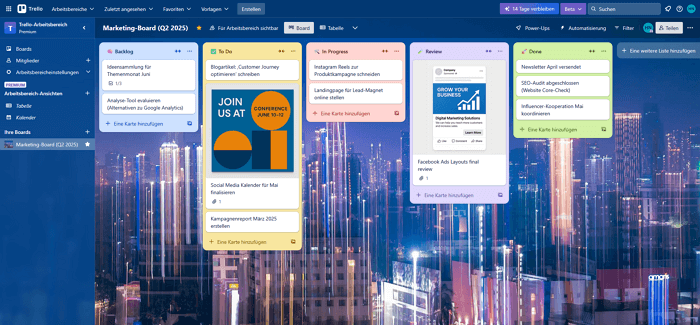
Its strengths lie in its ease of use and quick onboarding. The free version is sufficient for small teams, and integrations can be added via Power-Ups. Trello is ideal for simple workflows and to-do lists.
However, its limitations become clear as requirements grow: there is no true end-to-end encryption and no personal support. Core features like Gantt charts and task dependencies are missing in the base version. Trello is owned by Atlassian, a U.S.-based company, and is subject to the CLOUD Act. If you need more advanced functionality and stronger data protection, Stackfield is a solid alternative to Trello.
Who is it for? Small teams, individual projects, and beginners. Not suitable for organizations with compliance requirements or complex projects with many dependencies.
Pricing: Free (up to 10 users per workspace), Standard from approx. $5 per user / month, Premium from $10 per user / month, and Enterprise from $17.50 per user / month (billed annually).
Microsoft Project & Teams: The enterprise heavyweight
Microsoft Project is the classic tool for detailed project planning, while Microsoft Teams serves as the communication hub. Together – often referred to as "Microsoft Planner" – they form a comprehensive solution for enterprises. Their market strength comes from the Office 365 bundle, as many organizations already use Teams. However, a closer look reveals that two separate products don’t automatically create a seamless platform.
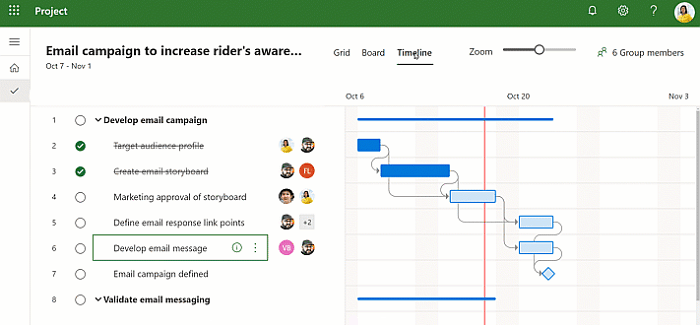
Its strengths lie in deep integration within the Microsoft ecosystem. If you already use Outlook, SharePoint, and Excel, getting started is straightforward. MS Project offers enterprise-grade project planning with Gantt charts and network diagrams.
That said, there are important limitations: Microsoft is subject to the CLOUD Act. There is no true end-to-end encryption. The learning curve is steep, especially for MS Project. Teams is often included in Microsoft 365 bundles but can still lead to additional licensing costs. There is no personal support. And importantly, these are two separate products with different workflows. We’ve explored in a separate article why Teams alone is only a makeshift solution for project management.
Who is it for? Organizations deeply embedded in the Microsoft ecosystem that are willing to accept trade-offs in data protection and digital sovereignty.
Pricing: Microsoft Planner (formerly Project) from approx. €9.40 (Plan 1), Professional from approx. €28.10, and Enterprise from approx. €51.50 per user / month (billed annually). Microsoft Teams is often priced separately in the EU at around €3.70–€5.60 per user / month.
MeisterTask: The German kanban solution
MeisterTask is a German tool with a strong focus on simplicity. The software is GDPR-compliant, and according to the provider, data is hosted in the EU or Germany. For teams looking for a straightforward Kanban board without a steep learning curve, MeisterTask is a solid option.
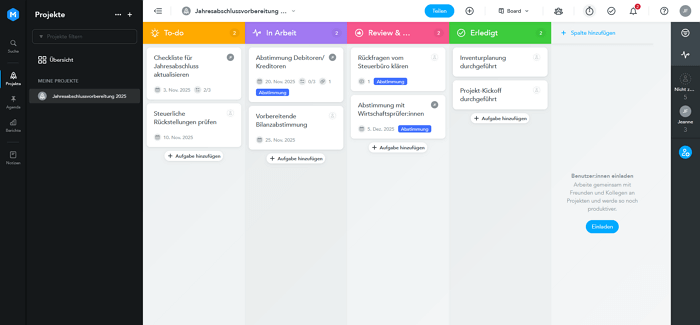
Its strengths include German hosting and full GDPR compliance. The intuitive Kanban boards make it easy to get started without extensive onboarding. A standout feature is its integration with MindMeister, enabling brainstorming and mind mapping directly within workflows. The interface is clean and easy to use.
However, limitations arise due to its lack of a comprehensive approach: there is no built-in chat or video conferencing. True end-to-end encryption is missing. For complex projects with advanced requirements, the feature set may fall short. Phone support is not available.
Who is it for? Small agile teams looking for a simple German solution without complex project management needs or advanced features like multi-project management.
awork: A modern tool for agencies
awork is a relatively new German project management tool based in Hamburg. It focuses on a modern interface, agency workflows, and resource planning. Its clean design and strong mobile app make it easy to get started – especially for agencies and creative teams.
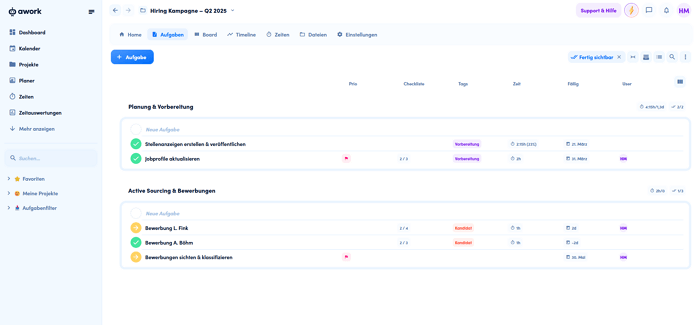
Its strengths lie in its modern interface. Built-in resource and capacity planning helps distribute tasks across team members efficiently. It also offers a solid mobile app and native time tracking.
However, limitations become apparent with more advanced requirements: there is no true end-to-end encryption. While awork ensures GDPR-compliant data processing and German hosting, it relies on Microsoft Azure infrastructure. Since Azure is a U.S. provider, data is subject to the CLOUD Act – limiting full data sovereignty. Native chat and video conferencing are not included, and phone support is not available.
Who is it for? Agencies and creative teams that value design and resource planning. Less suitable for public sector organizations or highly regulated industries with strict compliance requirements.
Pricing: Basic from €5 per user / month, Standard from €11 per user / month, Professional from €19 per user / month (billed annually), and Enterprise pricing available on request.
How to choose the right project management tool
You now have a detailed overview of the best project management tools. But which one is actually the right fit for your team? The decision depends less on feature lists and more on your specific use case. The following scenarios will help you narrow down your options.
Data privacy & compliance as a deal-breaker:
If you operate in a regulated industry, there’s often no real choice. Government agencies, healthcare organizations, and companies in the financial sector typically face strict requirements, making U.S.-based tools subject to increased scrutiny. In these cases, only solutions with German hosting, ISO 27001 certification, and BSI C5 attestation are viable options. Stackfield is currently the only all-in-one solution that meets all of these data security and GDPR requirements at the same time.
Team size & complexity:
Small teams with simple workflows and manageable projects can get started easily with Trello or MeisterTask. As teams grow and need to manage multiple projects in parallel – while handling dependencies – more advanced functionality becomes essential. Tools like Asana, Monday.com, or Stackfield are a good fit here. At the enterprise level, with 100+ users, multi-project management, and resource planning, Stackfield, MS Project, or ClickUp are the strongest options.
Budget & total cost of ownership:
The monthly price per user only tells part of the story. Many teams pay not just for a PM tool, but also for Slack, Zoom, Dropbox, and other software. When you add up these costs, the total often exceeds that of an all-in-one solution like Stackfield. Before making a decision, calculate your total cost of ownership (TCO) and compare your current tool stack with a consolidated platform.
All-in-one vs. best-of-breed:
If your company already relies on a well-established tool stack and you simply want to add a dedicated PM solution, a specialized tool like Asana or awork can make sense. However, if your goal is to reduce tool sprawl, eliminate workflow fragmentation, and centralize work in one place, an all-in-one platform is usually the better choice.
| Criterion |
Empfehlung |
| Maximum data privacy |
Stackfield |
| Easy Kanban entry |
Trello, MeisterTask |
| Agile marketing teams |
Asana |
| Agencies & creatives |
awork |
| Microsoft ecosystem |
MS Project |
| Maximum feature depth |
ClickUp |
| AAll-in-one + data privacy |
Stackfield |
Conclusion: Which project management tool is right for you?
No single project management tool is the best choice for every team. The right decision depends on your team size, industry, data protection requirements, and available budget. Each of the tools presented has its place in the market: Trello is great for quick onboarding, Asana for agile marketing teams, and awork for agencies. But if you take data privacy, compliance, and tool consolidation seriously, it’s hard to ignore a German all-in-one solution that brings everything together.
Stackfield is our clear recommendation for organizations looking to avoid dependence on U.S. providers, require true end-to-end encryption, and want to equip their team with one platform instead of five separate tools. Personal support in German, ISO 27001 certification, BSI C5 attestation, and German-based hosting make Stackfield one of the most secure project management solutions available. See for yourself.
FAQ
What are the three types of project management tools?
The three main categories are task and project management tools (e. g., Asana, Trello), collaboration and communication tools (e. g., Slack, Microsoft Teams), and all-in-one solutions that combine project management and collaboration in a single platform (e. g., Stackfield).
What should I look for when choosing a project management tool?
A good project management tool is intuitive to use, offers the right features for your team size and project complexity, is GDPR-compliant, and provides reliable support. Most importantly, your team actually needs to use it – adoption matters more than feature count.
What is the difference between project management and task management software?
Task management software focuses on managing individual to-dos and checklists. Project management software goes further by handling dependencies, milestones, resource planning, and overall project progress. Many modern tools, like Stackfield, combine both in one platform.
Is there a strong project management tool from Germany?
Yes, Stackfield is one of the few project management solutions that is fully developed and hosted in Germany. The platform combines project management, team chat, video conferencing, and document storage in a single tool – while meeting the highest data protection standards, including true end-to-end encryption, ISO 27001 certification, and BSI C5 attestation.
Which project management tool is best suited for government organizations?
Government organizations and the public sector face particularly strict data protection and IT security requirements. Stackfield meets all of these standards and also offers an on-premise option for organizations that want full control over their data. Personal phone support in German further enhances the offering.
Why choose a project management tool with integrated chat?
Using separate tools for project management and communication comes at a cost – both in time and budget. A tool with built-in team chat keeps communication and project context in one place. With Stackfield, team chat, tasks, video conferencing, and document storage are seamlessly integrated.
How easy is it to get started with Stackfield?
Very easy. After signing up, Stackfield guides new users step by step through the setup process. A 14-day free trial with full functionality is available for a risk-free start – no credit card required.