No more manual plan updates
Stop maintaining spreadsheets after the fact. In Stackfield, your timeline and tasks are connected: when your team completes a task, your plan updates instantly.
Manage projects more efficiently
The essentials at a glance
- Your project’s control document: A project plan brings together goals, tasks, timeline, budget, roles, and communication channels in one central place.
- Static plans become outdated quickly: Excel spreadsheets lose relevance within days because changes, communication, and task statuses are managed in different places.
- Eight steps to project planning: This guide follows established standards such as DIN ISO 21502:2024 and provides practical methods for each phase.
- A living single source of truth: Tools like Stackfield combine Gantt charts, task management, time tracking, and team communication in one workspace, keeping your project plan up to date instead of outdated.
You’re supposed to create a project plan, but instead of clarity, chaos emerges: five different versions of Excel files are circulating, coordination gets lost in emails, and tasks disappear in chat threads. No matter how large or small the project is, without a well-structured plan, it is difficult to achieve your goals. And this is not an isolated case: according to an analysis by McKinsey and Oxford Global Projects, large IT projects often end up costing twice as much as planned. The reason is rarely a lack of expertise, but unclear decision-making processes and a lack of structure.
This guide shows you step by step how to create a project plan that actually guides your team. As a point of reference, we use Stackfield, an all-in-one platform that combines project planning, communication, and file management in a secure workspace.
Create a project plan: what makes a good plan
The Project Management Institute (PMI) defines a project plan in the PMBOK Guide as a project management plan: a comprehensive document that consolidates all subplans of a project. It is important to distinguish it from related terms:
- The project charter clarifies stakeholder approval before the project begins.
- DThe work breakdown structure (WBS) breaks the work down hierarchically into work packages.
- And the Gantt chart? It is just one of several ways to visualize the timeline, not the plan itself.
Create a project plan: an integral part of project management
Project planning defines how a team achieves its project goals within a defined framework, using available resources, existing expertise, and a structured timeline.
Every project includes three core components that are closely interconnected:
- Scope: size, objectives, and requirements of the project
- Resources: budget, involved people, and available equipment
- Time: broken down into individual tasks and their durations
These components are interdependent and influence each other. If the timeline shifts, it affects budget and resources. If the scope increases, effort and costs rise. It is up to the project manager and the team to keep these interactions under control.
A project plan is never created in isolation. It is embedded in the entire project management process, from initiation through planning and execution to completion. In each project phase, the plan provides the orientation the project team relies on. According to the GPM study "Projectification 2.0", around 34.5 % of all work in Germany is carried out in projects. At this scale, a well-structured project plan is not optional but essential for any project manager aiming to deliver results.
Create a project plan: structure and components
A well-designed project plan is an official control document that defines how the project will be executed, monitored, and completed. Important: it is an ongoing process that is continuously refined throughout the project lifecycle.
The following table outlines all components of a complete project plan along with suitable project management methods for each area:
| Component |
Description |
Method / Tool |
| Project goals |
What should be achieved? |
SMART method |
| Scope definition |
What is included and what is not? |
In scope / out of scope |
| Tasks & work packages |
Hierarchical breakdown of work |
Work breakdown structure (WBS) |
| Timeline with milestones |
Sequence, dependencies, buffers |
Gantt chart, roadmap |
| Roles & responsibilities |
Who does what? |
RACI matrix |
| Budget |
Personnel, materials, buffers |
Cost plan |
| Communication plan |
Who informs whom, when, and how? |
Meeting formats, status reports |
| Risk assessment |
Potential obstacles and countermeasures |
Risk register |
All components are interconnected. A project plan is only as strong as its weakest element. For example, without a clear scope definition, even the best milestones cannot prevent scope creep.
Create a project plan: from concept to execution in eight steps
The following eight steps build on each other and guide you from a high-level overview to detailed planning. Each step includes a practical method or tool you can apply immediately. The planning approach is based on established standards such as DIN ISO 21502:2024 and the PMBOK Guide from the Project Management Institute. The result is a project plan that not only works on paper but actually guides your team.
Step 1: Understand your stakeholders
Before defining goals, you need to know who is involved in the project and what expectations they have. This is why stakeholder analysis is the first step. Without understanding stakeholder interests, your planning will miss the mark.
Typical stakeholder groups and their roles in a project:
- Clients / sponsors: approve budgets and make strategic decisions
- Project manager: coordinates planning, execution, and communication
- Team members: carry out operational work packages
- Customers / end users: define requirements and evaluate results
- External partners: provide input, consulting, or technical resources
At this stage, it is also a good idea to define key project roles and assign them clearly to stakeholders and team members. All subsequent steps in the project will become much easier if roles and responsibilities are clearly established from the beginning.
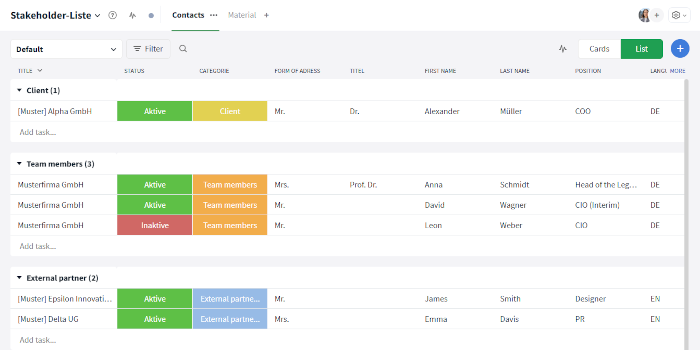
Example of a stakeholder list in Stackfield
Tip: Maintain your stakeholder list in a shared workspace so everyone always has access to the same information. The easiest way to do this is with Stackfield.
Step 2: Define goals and outcomes
Clear project goals are the foundation of any plan. The SMART method helps you formulate goals in a way that makes them measurable and achievable:
- Specific: Implement a centralized ticketing system in customer support
- Measurable: Reduce processing time by 20%
- Achievable: Feasible with the existing team and budget
- Relevant: Aligned with company strategy and supported by all stakeholders
- Time-bound: Completion within six months
Since some tasks must be completed before others can begin, it is important to consider dependencies early on.
At the same time, define milestones as control points. They mark the completion of key project phases and make progress visible. Identify dependencies and potential risks between individual goals early. A PMI study shows that 37% of failed projects fail due to unclear goals. Invest enough time in this step before moving into detailed planning.
Step 3: Define scope with in scope / out of scope
The project scope defines what is included in the project and what is deliberately excluded. This distinction protects you from scope creep, meaning the gradual expansion of the project scope. According to PMI, 52% of all projects experience scope creep.
Before detailed planning, define five to ten clear bullet points for both sides:
| In scope ✔ |
Out of scope ✖ |
| Implementation of the ticketing system for customer support |
Integration with the CRM system |
| Training for all service employees |
Migration of the telephony infrastructure |
| Migration of existing support requests |
Redesign of the customer website |
| Test phase with a pilot group |
Expansion to international locations |
Align the scope document with all stakeholders and document it in writing. This helps prevent later discussions about what is or is not part of the project.
Step 4: Create a work breakdown structure and define work packages
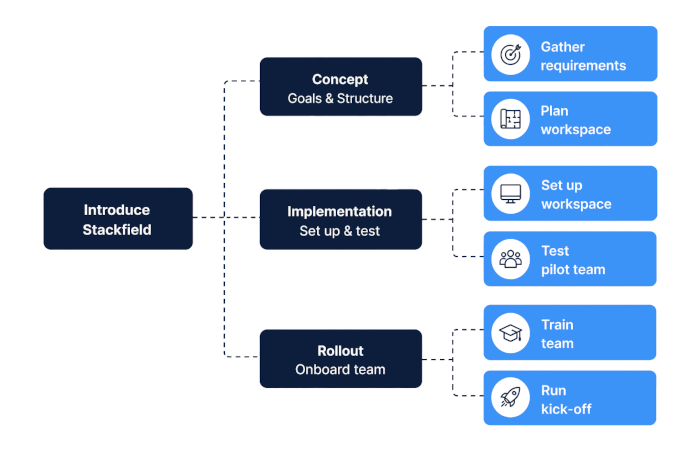
The work breakdown structure (WBS) divides your project hierarchically into manageable work packages. Think of it as a tree structure: at the top is the overall project, followed by three to seven main areas, which are further broken down into individual work packages.
A good work package meets four quality criteria:
- Outcome-oriented: "Requirements specification completed" instead of "Work on requirements specification"
- Clearly assigned: One person or role is responsible
- Estimable: Effort can be quantified in person-days
- Verifiable: It is clearly measurable whether the package is complete
Design work packages so they can be completed within five to 15 days. As a guideline: for projects up to six months, 30 to 80 work packages are realistic; for projects lasting six to 18 months, 60 to 150.
Each work package should include the following standard fields:
- Title and short description
- Expected outcome or deliverable
- Responsible person
- Estimated effort (in person-days)
- Dependencies on other work packages
- Priority
This level of detail ensures that all tasks remain manageable and progress can be measured effectively.
Step 5: Assign roles and responsibilities
Once the work packages are defined, you clarify who takes on which role. The RACI matrix is the standard tool for this:
- R – Responsible: Executes the task
- A – Accountable: Ultimately responsible for the outcome
- C – Consulted: Provides input and expertise
- I – Informed: Kept up to date on progress
| Task |
Project management |
Business unit |
IT |
Management |
| Gather requirements |
A |
R |
C |
I |
| Configure system |
R |
C |
A |
I |
| Conduct pilot test |
A |
R |
R |
I |
Step 6: Build the timeline, milestones, and Gantt chart
Now you arrange the work packages in a timeline. Start by defining dependencies: which tasks must be completed before others can begin? Identify the critical path, meaning the sequence of tasks where any delay will impact the entire project.
The Gantt chart is the standard visualization for this step. It displays tasks as horizontal bars on a timeline, including dependencies and milestones. Project management software like Stackfield links Gantt charts directly to task status and team communication, so the plan stays up to date automatically.
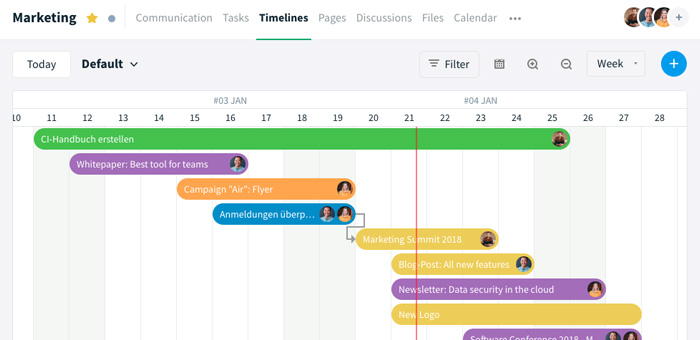
Example of a Gantt chart in Stackfield
Two key guidelines for your project timeline:
- Plan buffers: For critical tasks, estimate two days instead of one
- Keep workload realistic: Assume 70 to 80% capacity per person, not 100%
Keep it simple: A structured project plan is the foundation for managing projects. However, less is more. If a plan becomes too detailed, it loses flexibility. A plan should include all necessary tasks and milestones, but remain adaptable to changing conditions. This not only reduces risks but also leaves room for spontaneous ideas from the team. The rolling wave planning principle supports this: plan near-term phases in detail and future phases at a higher level.
Step 7: Calculate budget and resources realistically
Every project needs a realistic cost estimate. Capture all relevant cost categories:
- Personnel costs (internal and external)
- Materials (software, hardware, equipment)
- Licenses and recurring fees
- External services (consulting, freelancers)
- Travel expenses and training
Include a budget buffer. Projects often exceed initial estimates, and even smaller initiatives are not immune to cost increases. Thoughtful capacity planning helps you identify resource bottlenecks early.
Tip: Link the budget directly to the work packages from step four. This allows you to identify cost drivers early and take corrective action before the budget gets out of control.
Step 8: Schedule the kick-off meeting
The kick-off meeting marks the official start of the project. This is where you align all stakeholders, confirm roles, and create a shared understanding of the project.
A typical kick-off agenda looks like this:
- Present project goals and expected outcomes
- Review scope and milestones together
- Confirm roles and responsibilities
- Define communication channels and meeting cadence
- Outline next steps and initial work packages
- Clarify open questions and gather feedback
The kick-off is not a one-time event. Regular status meetings ensure the plan stays on track, keep the team aligned, and make sure changes are incorporated into the plan in time.
"Before, we worked with many different tools and cloud services, where we had to gather information from multiple places in a time-consuming way. With Stackfield, we can now view, comment on, and manage information at a glance."
Marcus Ernst, Creative Project Manager at Mack NeXT / Europa-Park
Why static project plans fail due to team communication
Imagine this: you create a detailed project plan in Excel, send it to your team via email, and ask for feedback. Two days later, there are five versions of the file, three of them stored locally on different devices. Status updates are in chat, decisions are buried in email threads, and files are scattered across network drives. The result: no one knows which version is the current one.
This is exactly the problem with scattered information. No one knows which version applies, and valuable working time is lost. According to McKinsey, employees spend almost 20% of their workweek searching for and gathering information. That is nearly eight hours per week not spent on actual project work, but on piecing together fragmented information. Classen Group faced this exact issue and successfully moved away from relying solely on email by using Stackfield.
The following table shows the difference between a static plan and an integrated project plan in an all-in-one tool:
| Criterion |
Static plan (Excel / email / chat) |
Integrated plan (all-in-one tool) |
| Up-to-dateness |
Outdated after a few days |
Automatically up to date |
| Task status |
Manual updates required |
Visible in real time |
| Communication |
Scattered across email, chat, meetings |
Directly linked to tasks |
| Files |
Multiple storage locations, version chaos |
Centralized in one workspace |
| Decisions |
Not traceable |
Documented in discussions |
| Risk |
Duplicate work, missed deadlines |
Transparency and traceability |
The typical issues caused by a lack of integration are always the same:
- Team members work with outdated deadlines.
- Tasks are completed twice.
- Decisions cannot be traced afterward.
All of this costs time, money, and puts project success at risk. The solution is not a better Excel template, but a project plan that brings communication, tasks, and files together in one place.
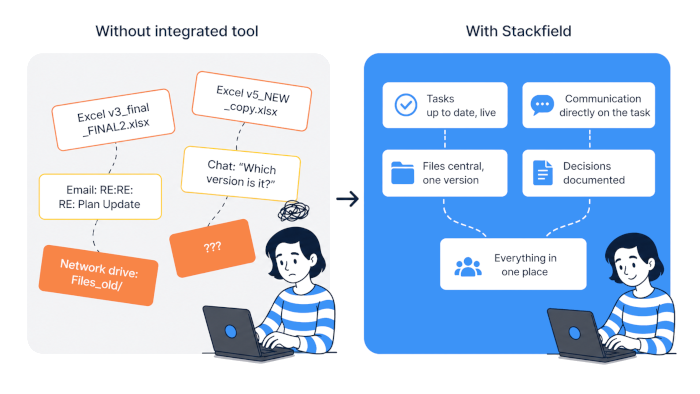
Create a project plan with Stackfield – less effort, more clarity
A living project plan needs an environment where timelines, tasks, communication, and files work together. The choice of the right project management tool determines whether your plan remains a static document or becomes a true control center.
This is exactly where Stackfield comes in: Instead of spreading individual planning steps across multiple tools, you bring everything together in one secure workspace. This turns your project plan from a static document into a real control hub.
Stackfield features at a glance:
- Gantt charts with linked tasks: Dependencies are visible at a glance, and your timeline updates automatically when dates change. No more manual updates. A real-world example is the COTESA case study, where the manufacturer uses Gantt charts and task management specifically for project control.
- Integrated team communication (chat, discussions, video conferencing): Decisions are documented directly within tasks. No searching through email inboxes, no lost agreements.
- Time tracking and budget planning: Track resource usage in real time and identify cost drivers before your budget gets out of control.
- File management within the workspace: All project documents are stored in one place. Version conflicts and duplicate storage structures become a thing of the past.
- True end-to-end encryption, ISO 27001, BSI C5, German data hosting: Especially relevant for teams in the public sector or compliance-sensitive industries that need to protect sensitive project data such as budgets, personnel, and strategy.
Are you still planning or already managing? Manually maintained lists cost you hours of coordination every week. With Stackfield, use an environment where your timeline updates automatically with every completed task. Secure, GDPR-compliant, and intuitive.
Try it free for 14 days
FAQ
What should be included in a project plan?
A complete project plan includes project goals, scope definition, tasks and work packages, a timeline with milestones, roles and responsibilities, a budget, a communication plan, and a risk assessment. All components are interconnected and should be updated regularly.
What is the difference between a project plan and a work breakdown structure?
The work breakdown structure (WBS) is a sub-plan within the overall project plan. It represents the hierarchical breakdown of the project into individual work packages and answers the question "What is included?". The project plan goes further by also covering timeline, budget, roles, communication, and risks.
How detailed should a project plan be?
This depends on the project phase. The rolling wave planning principle is widely used: plan near-term phases in detail and future phases at a higher level. Increase the level of detail progressively as the project evolves. As a guideline, 30 to 80 work packages are typical for projects lasting up to six months.
Are there standards or guidelines for project plans?
Yes, but they are voluntary. DIN 69901 defines basic project management terminology, DIN ISO 21502:2024-12 provides guidelines for project planning, and the PMBOK Guide from PMI offers an internationally recognized framework. DIN standards can be obtained via DIN Media. None of these standards are mandatory, but they provide solid guidance.
Who should be involved in creating a project plan?
A good project plan is created collaboratively. Stakeholders, subject matter experts, and future task owners should be involved early on. The project manager coordinates the process, but the content comes from the team itself. Tips on task distribution can help you clearly assign responsibilities.