A project plan is in place and the tasks have been assigned. But two months later, the steering committee asks: "Are we still on schedule?" How can you tell at a glance?
A project is like a long-distance run: it helps to break the route down into milestones that everyone involved can focus on. That is exactly where a well-structured milestone plan comes in. It condenses complex project phases into a small number of key decision points and makes delays visible before they become a problem. In Stackfield, this plan becomes a living control center, directly connected to tasks, team communication, and reporting, without parallel Excel versions or outdated status slides.
Set up a milestone plan without spreadsheet chaos Instead of maintaining your next plan in an Excel file that no one opens after two weeks, you can create milestones directly in Stackfield, link them to tasks, and make project progress visible to everyone involved. No version ping-pong, no manual reporting, no guesswork about which status is current.
Set your first milestone
What should a classic milestone plan include?
A milestone plan is a structured overview of the most important stage goals in a project. These milestones mark the completion of a phase or a significant decision point, similar to mile markers along a road: once you pass them, all preceding tasks have been completed.
In project management, classic milestones include:
- the start and / or end of the project
- the start and / or end of a project phase
- the completion of a concept
- the start of a test phase
- contract signings
- important decision points
What matters is that milestones are specific, verifiable, and scheduled. This gives you a quick overview of the current status, even in complex projects, and alerts you to delays before they become a problem.
When is a milestone plan used?
A milestone plan is used whenever a project requires a structured approach. It is particularly valuable in the following situations:
- Complex projects involving multiple teams: When many people, and potentially freelancers, are involved, a milestone plan helps keep everyone aligned and working toward the same objectives.
- Long-term projects: The longer a project runs, the more important interim goals become for maintaining both momentum and control.
- Critical deadlines: Milestones help identify and make use of schedule buffers, making it easier to stay on track and meet key deadlines.
- Clear communication: For external stakeholders such as clients or suppliers, a milestone plan provides an easy-to-understand overview without overwhelming them with operational details.
- Early identification of issues: A milestone plan quickly reveals when a project schedule is starting to slip, allowing corrective action to be taken before problems escalate.
3 examples of a milestone plan
A milestone plan is a useful tool across a wide range of industries and project types. Depending on the nature of the project, different stages may serve as milestones. Below are three examples from different fields:
Milestone plan for software development:
From requirements analysis to release, the milestone plan structures the key phases of the development process.
- Requirements analysis completed
- First prototype approved
- Acceptance testing passed
- Software released
Milestone plan for a construction project:
In construction projects, milestones mark the transition between major phases of the build.
- Building permit granted
- Structural shell completed
- Electrical installation completed
- Final acceptance completed
Milestone plan for event planning:
From booking the venue to the event day itself, the milestone plan helps ensure everything runs smoothly.
- Venue booked
- Invitations sent
- Service providers confirmed
- Event successfully delivered
Defining the right milestones in a project
Too many milestones clutter a project plan and create a false sense of control. Too few leave the team without clear direction. As a rule of thumb, five to ten milestones per project have proven effective. Any more than that dilutes their significance and can lead to reporting fatigue among steering committee members. Every well-defined milestone meets three criteria: it is phrased as a completed state, has a duration of zero days, and delivers a clearly measurable outcome.
The table below shows five common milestone formulations from day-to-day project work and their improved alternatives.
Poor
milestone |
Effective
milestone |
Why the
distinction matters |
| Develop design |
Design draft has been approved |
Describes an activity rather than a completed state, making it difficult to determine when it is truly finished. |
| Gather requirements |
Requirements document has been approved |
Formal approval makes the transition to the next phase measurable and verifiable. |
| Conduct testing |
Acceptance testing has been passed |
"Conduct testing" does not indicate whether issues were found. “Passed” provides a clear outcome. |
| Inform stakeholders |
Kick-off presentation has been delivered |
Communication is an ongoing process; the presentation is a clearly defined event with a specific completion point. |
| Create concept |
Rough concept has been approved by the client |
Approval turns the milestone into a reliable go / no-go decision point. |
Milestone planning in project management: Common mistakes to avoid
The following overview highlights four common pitfalls in milestone planning and the corresponding corrective actions used in practice:
| Mistake: |
Corrective action: |
| Setting unrealistic deadlines without any buffer, based purely on intuition. |
Use three-point estimation (optimistic, realistic, pessimistic) or draw on historical data from similar projects. |
| Confusing a milestone with a task, such as "Conduct testing" instead of "Acceptance testing has been passed." |
Phrase every milestone as a completed state and verify that it has a duration of zero days and a clearly measurable outcome. |
| Failing to update schedule deviations promptly, causing stakeholders to work with outdated information. |
Establish a fixed weekly status review and document changes using milestone trend analysis. |
| No one maintains the plan after the kick-off meeting, leaving it to gather dust in the project folder. |
Assign a responsible person to each milestone and integrate the plan into the tool the team uses every day. |
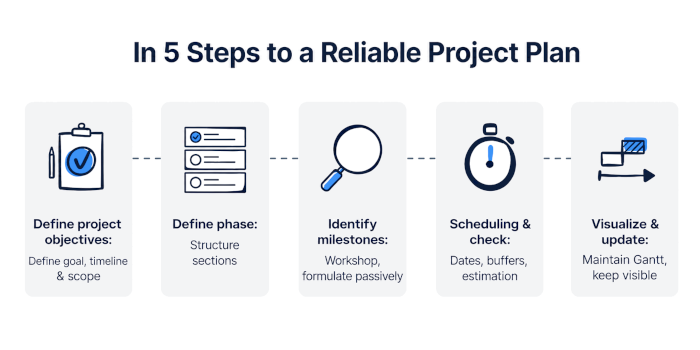
Creating a Milestone Plan: 5 Steps to a Reliable Project Plan
A reliable milestone plan is not created in isolation. It requires input from the team, the right project documentation, and a structured process. The following steps have proven effective in practice:
Step 1: Define the project objective and overall framework:
Before setting the first milestone, you need a clear understanding of the project objective and timeline. What should be achieved by the end of the project? By when? And which constraints, such as budget, resources, or fixed external deadlines, are non-negotiable? The answers to these questions form the foundation for all subsequent planning activities.
Step 2: Define the project phases:
Break the project down into meaningful phases, such as planning, implementation, and acceptance. These phases provide the overall structure from which milestones will be derived in the next step. The appropriate number of phases depends on the complexity of the project.
Step 3: Identify milestones with the team:
Milestones are best identified collaboratively rather than at a desk in isolation. For most projects, a one- to two-hour workshop is sufficient. Share key documents such as the project charter, work breakdown structure, and stakeholder list beforehand so that everyone arrives prepared. During the workshop, define milestones based on phase transitions and key deliverable states. Each milestone should be phrased as a completed state and linked to a clearly measurable outcome. Once the milestone list has been created, review and align it with the project sponsor and steering committee.
Step 4: Schedule milestones and check feasibility:
Every milestone needs a realistic target date. Consider how much time team members actually have available, whether adequate buffers have been built into the schedule, and which milestones are fixed due to contractual or regulatory requirements versus those that can remain flexible. Gut feeling alone is not enough. Techniques such as three-point estimation (optimistic, realistic, and pessimistic) or historical data from similar projects provide a much more reliable basis for planning.
Step 5: Visualize, communicate, and continuously update:
A milestone plan only delivers value when it is visible to everyone involved and evolves alongside the project. Visual representations, such as a Gantt chart in project management software like Stackfield, make the plan easy to understand and accessible to all stakeholders. Since no project follows the original plan perfectly, regular updates are an essential part of the process. Teams that record deviations early maintain visibility and stay in control of project execution.
Visualizing a Milestone Plan: Gantt Chart, Kanban Board, or Table?
The most suitable way to visualize a milestone plan depends on what you want to communicate. If the goal is to show the project timeline and dependencies between phases, a timeline-based view is essential. If you only need to communicate the current status, a simple list may be sufficient. The following overview compares the three most common options:
| Visualization Method |
Timeline |
Dependencies Visible |
Best Suited For |
Limitation |
| Gantt Chart |
Yes |
Yes |
- Milestone planning
- Project controlling
- Steering committee reporting
|
Requires suitable project management software (e.g. Stackfield) |
| Kanban Board |
No |
No |
- Operational task management
- Sprint planning
|
No timeline view – milestone due dates remain invisible |
| Table / List |
Limited |
No |
- Small projects
- Quick status overviews
|
No visual timeline; dependencies must be tracked manually |
For creating a reliable milestone plan, the Gantt chart is the most powerful visualization method. It provides an immediate overview of upcoming decision points and shows how delays affect the overall project schedule. In Stackfield, Gantt charts are integrated natively: milestones can be created directly within the chart, linked to tasks, and kept visible to all stakeholders.
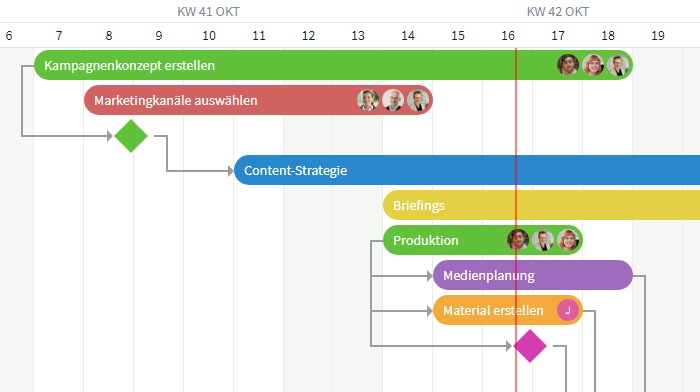
Milestones in a Gantt view within Stackfield
Milestone Plans in Project Management: Strengths and Limitations
Benefits of a milestone plan in project management
Structure: A milestone plan gives the project timeline a clear structure. It highlights the most important stage goals and helps break complex projects down into manageable phases.
Transparency: By focusing on key events, the project’s progress becomes easier for everyone involved to understand. This improves project communication both within the team and with stakeholders.
Motivation: Reaching a milestone creates a visible sense of achievement that motivates the team and strengthens focus on the next steps. This encourages engagement and goal-oriented work among project members.
| Challenges of Milestone Planning and How Stackfield Solves Them |
| Challenge |
How Stackfield Helps |
| Lack of detail: Because milestone plans focus on key events, smaller but still important tasks can easily be overlooked. |
With reminders in Stackfield, you can set notifications for any type of task, ensuring that no detail falls through the cracks. |
| Dependencies: Delays in one phase can directly impact subsequent phases and put the entire schedule at risk. |
Stackfield's Gantt chart visualizes the entire project timeline and all dependencies at a glance. |
| Rigidity: A tightly planned milestone schedule leaves little room for adjustments when unexpected changes occur. |
Stackfield's "Critical Path" feature helps you quickly identify bottlenecks and potential delays within the project. |
Why Excel Is Not Enough: Which Tool Is Right for Milestone Planning?
A familiar scenario: the milestone plan is carefully created in Excel during the project kick-off, distributed by email, and from that point on begins to take on a life of its own. One person saves a copy to their desktop, another updates a version in SharePoint, and the client receives a PowerPoint slide from the previous week. No one can say with certainty which file is actually the current version.
The consequences affect exactly the areas where it hurts most:
- Responsibilities become blurred across different versions.
- Schedule delays often remain unnoticed until the next milestone has already been missed.
- Coordination with external partners or the steering committee consumes hours every week that could otherwise be spent on project control and execution.
This highlights an important reality: effective milestone planning in project management requires a dedicated tool rather than a collection of disconnected files.
Choosing the Right Tool for Your Milestone Plan
The right tool depends on a few key questions:
- How large is the team and how many people need to work with the plan simultaneously?
- How many projects run in parallel, and is a portfolio view required?
- How frequently does the plan need to be updated?
- What level of reporting is needed for steering committees and stakeholders?
- What are the applicable data protection and compliance requirements?
The following table compares three common options based on the most important criteria for milestone planning:
| Criterion |
Excel |
MS Project |
Dedicated PM Software (e. g. Stackfield) |
| Milestone visualization: |
Manual timeline |
Built into the Gantt chart |
Built into the Gantt chart |
| Linking milestones to tasks: |
Not available |
Available |
Available, directly connected to work packages |
| Real-time collaboration: |
Limited |
Limited |
Available |
| Data hosting in the EU: |
Depends on storage location |
Depends on tenant configuration |
Germany |
| True end-to-end encryption: |
No |
No |
Yes |
Stackfield is the German project management solution without compromise: Gantt charts, milestone functionality, true end-to-end encryption, and German data hosting – all within a single platform. For public administration, agencies, and compliance-sensitive industries, these capabilities are not a nice-to-have but a requirement.
Implementing Your Milestone Plan Directly in Stackfield
In Stackfield, milestones can be created directly within the Gantt chart. Each milestone can be linked to tasks, making dependencies immediately visible. Responsibilities can be assigned at both the task and milestone level, and progress updates automatically as related tasks are completed. Stakeholders can either receive read-only access to the plan or view a compact dashboard, eliminating the need to manually maintain status-reporting slides.
In day-to-day project work, this means no parallel Excel versions, no separate reporting spreadsheets, and no debates about which version is the current one. The project plan, tasks, and team communication all live within the same all-in-one platform. When a deadline changes, the impact on the overall project schedule becomes visible immediately. The milestone plan evolves from a document that gathers dust after kick-off into a living project management tool – whether you're developing software, constructing a building, or organizing an event.
Ready to Create Your First Milestone? Teams that manage their milestone plans in Stackfield no longer waste time searching for the latest file version, manually compiling status reports, or clarifying who is working from which version of the plan. Everyone sees the same up-to-date information in real time.
Get started for free today
FAQ
What are the advantages of project management software over Excel for milestone planning?
Excel quickly reaches its limits when milestones need to be actively managed. Different versions circulate, dependencies cannot be properly visualized, and status updates have to be compiled manually. In Stackfield, milestones are created directly within the Gantt chart and linked to tasks. Any changes become immediately visible to all stakeholders, eliminating the need for manual reporting.
What is milestone trend analysis, and do I need it?
Milestone Trend Analysis (MTA) is a graphical project controlling method that plots the forecasted completion date of each milestone at every reporting point, making schedule shifts visible throughout the project lifecycle. It becomes particularly valuable for medium-sized projects or organizations running multiple projects in parallel. For smaller projects, a simple milestone status review is often sufficient.
Can milestone plans be used in agile projects?
Pure Scrum projects rarely use traditional milestone plans because they are organized around sprints and product increments. In hybrid project management, however, milestones remain an important tool, for example for release gates or reporting to the steering committee. The key difference is that, in an agile context, milestones typically represent tested product increments rather than abstract document approvals.
What should be prepared before a milestone planning workshop?
- An approved project charter with clearly defined objectives and framework conditions
- A high-level work breakdown structure covering the most important project tasks
- A stakeholder list including responsibilities and decision-making authority
- Key project dates provided by the sponsor, such as project start, project end, and fixed deadlines
How secure is my project data in a cloud-based solution?
Three factors are particularly important: data hosting within the EU, true end-to-end encryption, and certifications such as ISO 27001 and BSI C5. These become especially critical when working with compliance deadlines, strategic launches, or sensitive stakeholder information. Stackfield meets these requirements and stores your project data in Germany.