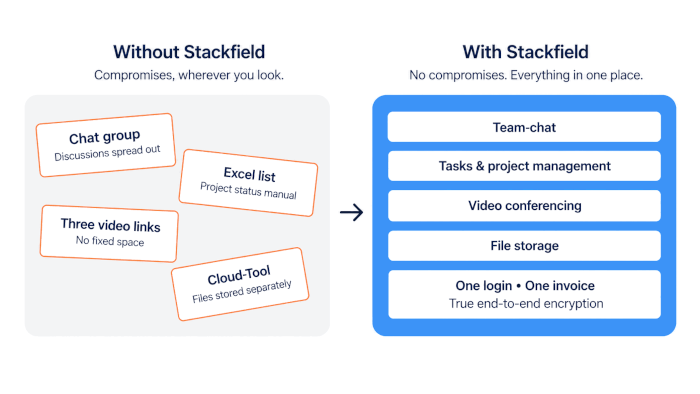
Monday morning, 9 a.m.: The deadline for the client project is three days away, but no one on the six-person team knows exactly who has taken on which task. Coordination happens in a group chat, the project status is tracked in an Excel spreadsheet, and there are three different video links for the weekly update. Many small teams assume that project management tools are mainly for large companies with their own IT departments. In reality, that misconception often costs more time than introducing the right tool ever would. So which tool is actually right for a team that wants to grow without losing track of its work?
The essentials at a glance
- One tool instead of five separate systems: Using separate tools for chat, tasks, files, and video calls costs small teams more time and money than the individual tools themselves.
- Scale without migrating later: A tool that supports multiple projects and growing teams from the start saves you from having to switch platforms in the middle of day-to-day operations.
- Get started without an IT project: Simple setup and fast, personal support save small teams time they cannot afford to spend on complex IT implementation.
- One platform, all the features: Stackfield natively combines tasks, team chat, video conferencing, and time tracking in a single application, including true end-to-end encryption.
No more compromises in project management Stackfield brings project management and team communication together in one platform without compromising on functionality. Try it free for 14 days with no risk.
Put an end to tool chaos now
The specific requirements small teams have for their project management tool
Small teams of five to 20 people have different priorities than an enterprise department with its own IT team. There is often no dedicated IT staff for complex rollouts, budgets are limited, and several client projects may be running in parallel. That is why the first few weeks usually determine whether a tool fits naturally into day-to-day work or becomes an additional burden.
Which features do small teams really need?
In practice, five areas determine whether a project management tool truly works for small teams:
- Task management and Kanban boards: The foundation for any team, but without unnecessary configuration effort.
- Integrated team communication: Chat and discussions directly within the tool eliminate the need for a separate app just for coordination.
- Simple time tracking: Important for billing as soon as client work or project-based work is involved.
- File storage without a separate cloud tool: Documents, contracts, and drafts belong where the related tasks are managed.
- Data protection and GDPR fundamentals: Many teams only start thinking about this when the first client asks where the servers are located, but it is worth considering from the very beginning.
The 5 best project management tools for small teams compared
Before looking at each tool in detail, here is a quick overview of server location, encryption, and team chat, the three factors that matter most for small teams.
| Tool |
Workflows |
Integrated team chat |
True end-to-end encryption |
Best suited for |
| Stackfield |
✔ |
✔ |
✔ |
Teams with high requirements for features and security |
| Asana |
✔ |
✖ |
✖ |
Creative and marketing teams |
| Trello |
✖ |
✖ |
✖ |
Freelancers, simple to-dos |
| MeisterTask |
✔ |
✖ |
✖ |
Agile Kanban teams |
| factro |
✖ |
✖ |
✖ |
Teams that need Gantt charts |
Legende:
✔ = available
✖ = not available
Stackfield: Project management without compromise for small teams
Stackfield is a German project management platform that combines task management, team communication, and file storage in one solution without compromising on individual features. The company has been on the market for more than 14 years and is ISO 27001 certified and BSI C5 attested.
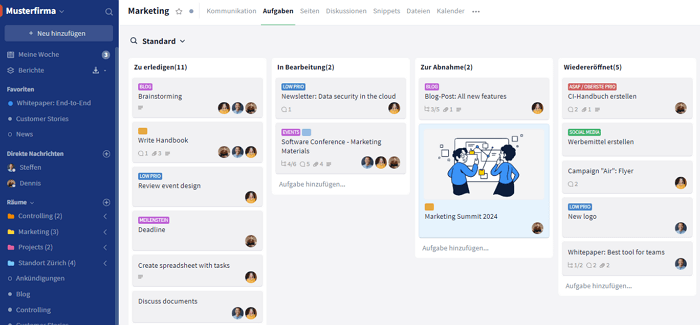
Best suited for: Small teams looking for a complete tool without compromising between functionality, ease of use, and security.
Strengths:
- Task management, team chat, video conferencing, time tracking, and file storage are already integrated, with no need for an additional tool.
- Gantt charts and portfolio management make it possible to manage multiple projects at the same time.
- True end-to-end encryption, ISO 27001, BSI C5, and German server hosting add a strong security layer to the broad feature set.
Limitations:
- A minimum of five licenses is required.
- Video conferencing is only available from the Premium plan, not in the Starter plan.
The Starter plan starts at €9 per user per month for chat, tasks, and Gantt charts. Video conferencing is included from the Premium plan at €18 per user per month, with a minimum of five users and a free 14-day trial.
Asana: Task management with classic list and Kanban views
Asana is an established task management platform with list, Kanban, and timeline views, as well as integrations with commonly used third-party software.
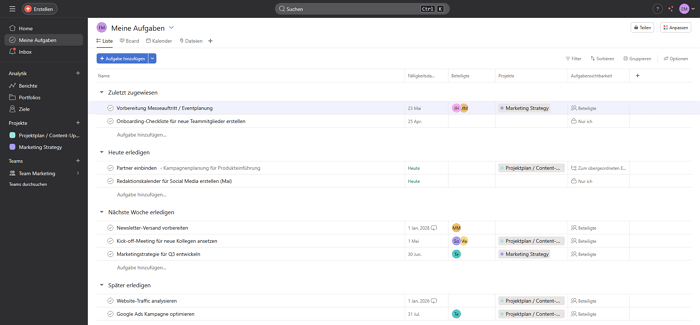
Best suited for: kleine Marketing- und Kreativteams mit wiederkehrenden Workflows, ohne strenge Compliance-Anforderungen.
Strengths:
- Workflow automation supports recurring processes.
- Integrations with common third-party software are available.
Limitations:
- No integrated team chat.
- Servers are located in the US.
- No true end-to-end encryption.
- No phone support.
The Starter plan begins at €10.99 per user per month when billed annually.
Trello: Kanban board with a streamlined feature set
Trello is a Kanban tool from Atlassian built around cards, lists, and optional Power-Ups for extending functionality.
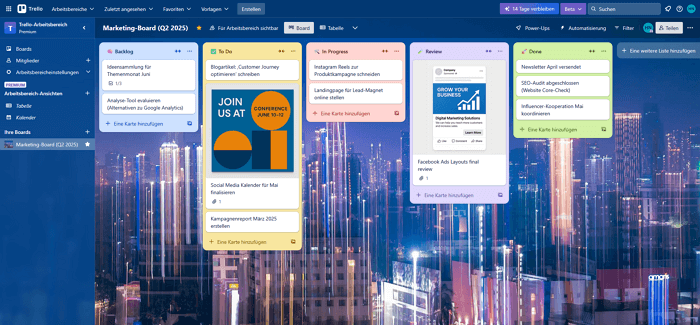
Best suited for: Very small teams or freelancer networks with simple task lists and no complex dependencies.
Strengths:
- Power-Ups allow the feature set to be expanded based on individual needs.
- Setup requires very little configuration effort.
Limitations:
- No native time tracking.
- No multi-step automations in the sense of full workflows.
- The company is headquartered in the US (Atlassian), and German-language support is not available.
- No true end-to-end encryption.
The Standard plan starts at USD 5 per user per month when billed annually.
MeisterTask: German Kanban solution with GDPR-compliant hosting
MeisterTask is a German Kanban platform focused on straightforward task management and EU-based hosting.
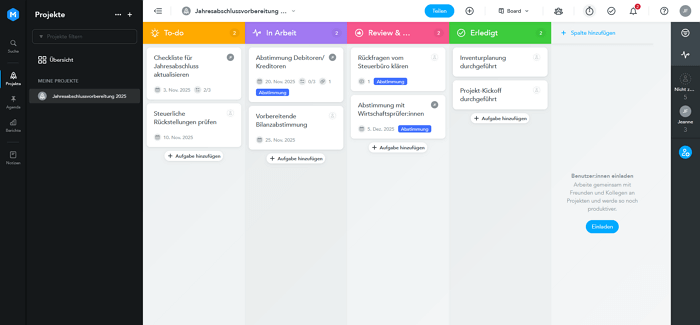
Best suited for: Small agile teams in Germany looking for a lightweight, EU-hosted Kanban solution without a wide range of additional features.
Strengths:
- Servers are located in Germany, with GDPR-compliant hosting.
- Phone support is available, especially on higher-tier plans.
Limitations:
- No integrated team chat.
- Video conferencing is not included.
- No true end-to-end encryption.
The Pro plan starts at €13.50 per user per month when billed annually.
factro: German project management with Gantt and portfolio views
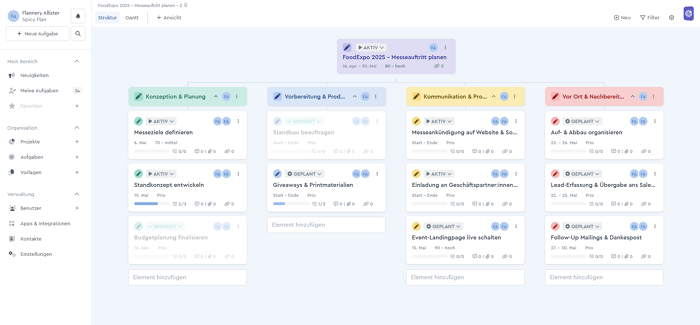
factro is a German project management platform with Gantt charts and cross-project portfolio views.
Best suited for: Small businesses or consultancies that need more planning depth than a simple Kanban board but do not require a full collaboration platform.
Strengths:
- Server location and data hosting are exclusively in Germany or the EU.
- Gantt charts with dependencies and milestones support detailed project planning.
- Portfolio management provides visibility across multiple projects.
- German-language support, including phone support, is available.
Limitations:
- No integrated chat.
- No automated workflows in the narrower sense.
- No true end-to-end encryption.
The Business plan starts at €19.99 per user per month, with a minimum of three users.
Expert tip: Before making a decision, calculate the total cost. A project management tool plus a separate chat tool, video conferencing solution, and cloud storage often costs more overall than a consolidated platform. For small teams with limited budgets, that difference can be significant.
What small teams should look for when choosing a project management tool
Five criteria can help small teams choose the right software:
- The right features without unnecessary complexity: It is not about having the most features, but the right ones for a team of five to 20 people.
- Data protection and GDPR compliance even on a limited budget: Server location, encryption, and subcontractors are worth considering even when budgets are tight.
- Ease of use and quick onboarding: Small teams do not have time for lengthy onboarding processes.
- Value for money and total cost: Separate solutions for chat, video, and tasks can quickly add up to a higher overall cost.
- Scalability as the team grows: What happens when the team grows from five to 20 employees and several projects are running in parallel?
The benefits of project management software for small teams at a glance
- Fewer tool switches mean more focus on the actual work.
- A clear overview remains possible even when several client projects are running in parallel.
- Responsibilities within the team become more transparent: who is doing what, and by when.
- The tool can grow with the team instead of requiring a later migration.
- Compliance is considered from the start instead of being added later at significant cost.
Project management tools for small teams: No compromises with Stackfield
For small teams, what ultimately matters is what makes day-to-day work easier: a tool that keeps tasks, communication, and files together instead of spreading them across multiple applications. Stackfield stands for project management without compromise, offering a broad range of features without sacrificing security.
True end-to-end encryption is an additional strong argument, but it is not the only reason to choose Stackfield. Small teams looking to rely on a single, secure project management tool for the long term will find a mature solution in Stackfield.
Ready for less tool chaos
Try Stackfield free for 14 days and see how tasks, team chat, and video conferencing work together in one platform.
Get started without compromise
FAQ
At what team size is dedicated project management software worthwhile?
Dedicated project management software is usually worthwhile for teams of just three to five people as soon as several people are working on tasks at the same time. Once coordination is spread across multiple channels and no one has a clear overview of open tasks, the lack of a central tool costs more time than setting up the right system. More important than the exact team size is whether several projects or client assignments are running in parallel.
Which features does a team of five to 15 people really need?
For a team of this size, the most important features are task management with a Kanban board, integrated team communication, simple time tracking for billing, and centralized file storage. Complex features such as multi-level resource management or extensive approval processes often only become relevant for significantly larger organizations and initially create unnecessary configuration effort. What matters more is that the tool can be set up quickly, works without lengthy onboarding, and scales as the team grows.
Does a small team also need to consider GDPR compliance when processing customer data?
Yes. The GDPR applies regardless of company size whenever personal data is processed. Small teams working with customer data should therefore consider server location, encryption, and the origin of subcontractors when choosing a tool, even if they do not have their own legal department. Having to switch tools later because a customer asks about data protection compliance costs significantly more time and effort than checking these requirements when selecting a tool in the first place.
How can a small team migrate to a new project management tool without losing productivity?
A gradual transition works best: Start by setting up a single, manageable project in the new tool while ongoing projects continue in the existing system. Many tools offer import options for commonly used applications, which can automate part of the migration. Dedicated support during the first few weeks reduces the workload that a small team without its own IT department would otherwise have to handle alone.
What distinguishes a consolidated tool like Stackfield from a combination of several standalone solutions?
A consolidated tool like Stackfield natively combines tasks, team chat, video conferencing, and file storage in a single application instead of requiring multiple standalone tools with separate contracts, integrations, and points of contact. This not only reduces administrative overhead but also limits the number of places where sensitive data needs to be stored and synchronized. True end-to-end encryption is one of several benefits, alongside less coordination effort and faster onboarding./p>
Almost finished...Please click the link in the email and confirm your email adress to complete the subscription process.
Never miss a post. Get awesome insights in your inbox.