Four open browser tabs, a pricing page, and an undecided IT department: Is the Business plan enough for your team, or do your external client projects mean you need Premium after all? Understanding how Stackfield's plans compare comes down to answering three questions: How big is your team, how strict are your access requirements, and how much growth do you expect? Starter, Business, Premium, and Enterprise differ in user limits, access controls, and additional features. In this guide, we'll walk you through the decision step by step.
The essentials at a glance
- Four plans, one platform: Starter (€9), Business (€14), Premium (€18), and Enterprise (€28) per user per month, billed annually, differ in user limits, security features, and additional functionality. The core product remains the same across all plans.
- User and workspace limits are the first deciding factor: Starter is limited to a maximum of ten users and three workspaces, while Business and higher plans offer unlimited users and workspaces.
- Video conferencing and advanced access controls from Premium: IP whitelisting, mandatory two-factor authentication (2FA), and audio and video conferencing are available directly within Stackfield, without requiring a separate tool.
- Stackfield's security comes standard: True end-to-end encryption, German data hosting, ISO 27001 certification, and BSI C5 attestation are included in every Stackfield plan, from Starter to Enterprise.
Secure teamwork without compromise with Stackfield Stackfield brings everyday collaboration together natively in one application: tasks, communication, and files are all protected by true end-to-end encryption. That means less switching between tools and more focus on the work that matters.
Experience Stackfield now
Project management with Stackfield: Tasks, communication, and file storage in one platform
Stackfield brings project management and team communication together natively in one application. Tasks with subtasks, projects with list, Kanban, and Gantt views, milestones, calendars, and time tracking are available alongside team chat, polls, and dedicated file storage. Mobile and desktop apps make it easy to work both on the go and at your desk.
A large portion of Stackfield's features remains the same across all plans. The foundation includes the complete set of core project management features, such as tasks, projects, workflows, and milestones, as well as the full range of essential security features: true end-to-end encryption, data hosting on servers in Germany, ISO 27001 certification, and BSI C5 attestation.
The plans differ in four key areas:
- User and workspace limits
- Access controls such as mandatory 2FA, IP whitelisting, and Single Sign-On
- Collaboration features such as conferencing, whiteboards, and project portfolios
- Administrative features for managing multiple sub-organizations
The comparison therefore comes down to two factors: a consistent foundation of core features and different levels of additional functionality.
Stackfield pricing and plans at a glance
Stackfield charges per user per month. All prices exclude VAT and are subject to applicable taxes. A minimum of five user licenses is required, and annual billing saves 17% compared to monthly billing. You can always find the latest pricing information on the Stackfield pricing page.
|
Starter |
Business |
Premium |
Enterprise |
| Price per user / month (excluding VAT, billed annually) |
€9 |
€14 |
€18 |
€28 |
| User limit |
max. 10 |
Unlimited |
Unlimited |
Unlimited |
| Workspace limit |
max. 3 |
Unlimited |
Unlimited |
Unlimited |
| Conferencing (audio / video / screen sharing) |
✖ |
✖ |
✔ |
✔ |
| Advanced security (IP whitelisting, mandatory 2FA) |
✖ |
✖ |
✔ |
✔ |
| Single Sign-On and YubiKey 2FA |
✖ |
✖ |
✖ |
✔ |
| KI Add-on (€3.90 / user / month) |
✔ |
✔ |
✔ |
✔ |
| OFFICE Add-on (€2.40 / user / month) |
✖ |
✖ |
✔ |
✔ |
| Public Sector Add-on (€2.40 / user / month) |
✖ |
✖ |
✔ |
✔ |
| Professional Secrecy Holders Add-on (€3.90 / user / month) |
✖ |
✖ |
✔ |
✔ |
All four add-ons are optional extras and are not automatically included in any plan. The AI add-on is available with every plan. The OFFICE, Public Sector (EVB-IT Cloud contract and document management system integrations for public authorities), and Professional Secrecy (additional agreement under Section 203 of the German Criminal Code) add-ons are available from Premium onwards.
Project management with Stackfield: These features are included in every plan
Stackfield brings project management and team communication together natively in one application. Here's what you get regardless of which plan you choose:
- Task management with Kanban, Gantt, and list views, milestones, workflows, and time tracking
- Team chat, polls, and one-on-one video calls directly within the platform, without needing a separate communication tool
- Dedicated file storage with folder structures, version control, and file-sharing links
- Mobile and desktop apps, calendar subscriptions, and integrations with Dropbox, OneDrive, Google Drive, and Box
- True end-to-end encryption, German data hosting, ISO 27001 certification, and BSI C5 attestation
What differs between plans: User and workspace limits, collaboration features such as video conferencing and whiteboards, and access controls such as mandatory 2FA, IP whitelisting, and Single Sign-On.
Starter: The ideal starting point for small teams
Your team is just getting started, you're working with a manageable number of people, and you're ready to stop coordinating tasks through emails and spreadsheets. Stackfield brings everything you need together in one tool: tasks, chat, files, and calendars, for up to ten users across a maximum of three workspaces.
Here's what a workspace could look like:
- Project workspace for everyday operations: Tasks with subtasks, Kanban and Gantt views, milestones, and time tracking, all in one place instead of spread across multiple tools.
- Team chat and one-on-one video calls directly in the platform: Quick discussions and updates without switching to another app.
- Dedicated file storage with folder structures: Store documents, presentations, and project files centrally, manage versions, and share them via links.
When your team eventually grows or a fourth project comes along, you can upgrade to a higher plan at any time, taking all your data, workspaces, and existing structures with you.
Business: For teams managing multiple projects simultaneously
Your team has grown, and so have your projects. Each project needs its own space, tasks, chat, and files, without topics getting mixed up or information getting lost. With unlimited users and workspaces, Stackfield grows alongside your team.
Here's how Business supports your daily work:
- A dedicated workspace for every project, department, and team: Tasks, chat, file storage, and calendars are kept neatly separated, so everyone only sees what's relevant to them.
- Time tracking and budget planning directly within each project: No external tools or manual data consolidation. Time spent and costs are visible right where the work happens.
- Reports with filtering options: Get a cross-project overview of tasks, progress, and time spent without having to gather information from multiple sources.
As your team continues to grow or new projects come along, simply create another workspace. No restructuring, no disruption to ongoing work.
Premium: When external collaboration and access controls become essential
Clients need to check project progress, freelancers need to collaborate, and meetings with multiple participants should take place directly within the platform. Premium is marked as the most popular plan on the pricing page because it addresses exactly the point where internal collaboration alone is no longer enough.
What Premium adds:
- Unlimited external users: Invite clients, freelancers, or partners directly into the relevant project workspace. They can only see that workspace, not the rest of your organization.
- Multi-participant video conferencing and screen sharing: Hold meetings directly within the project context, keeping decisions, files, and tasks together in one place.
- Project portfolios: See all ongoing projects at a glance, including dependencies, status, and progress, without manual reporting.
- Whiteboards: Collaborate visually in real time, directly within the platform. Ideal for workshops, planning sessions, and brainstorming with the entire team.
- IP whitelisting and mandatory 2FA: Restrict access to approved networks and enforce two-factor authentication for all users.
For agencies, consultancies, and teams that regularly work with external partners, Premium provides a central platform that brings everything together: internal workflows, external collaboration, and client communication in one place.
Enterprise: Centralized management for large organizations
Multiple locations, different departments, strict IT requirements, and the need to manage everything centrally. Enterprise is designed for organizations where administration and compliance are major priorities.
What Enterprise adds:
- One license package for all sub-organizations: Manage billing centrally across locations and subsidiaries, while users can seamlessly switch between organizational units with a single account.
- Single Sign-On and YubiKey-based 2FA: Sign in through your existing corporate infrastructure, with hardware-based access controls.
- User provisioning via API: Set up and manage new employees centrally without having to create individual accounts manually in Stackfield.
- User acknowledgment of compliance policies: Every user actively confirms the applicable policies, creating a documented, verifiable record.
For public authorities, law firms, and companies in regulated industries such as the critical infrastructure (KRITIS) sector, the BSI C5 attestation provides a foundation for audits and tenders, with a dedicated contact person available to answer questions directly.
Encryption and data hosting: Collaborate without compromise with Stackfield
Stackfield treats security as a standard feature across the entire platform. This foundation is included in all four plans:
For your daily work, this means you don't need to purchase an additional security tier or configure anything extra. Encryption applies to every workspace, file, and message, regardless of your subscription plan. One important consideration when choosing a plan: Access controls differ between plans, but the encryption itself does not. Mandatory 2FA and IP whitelisting are available from Premium onwards, while Single Sign-On and YubiKey authentication are included from Enterprise onwards. So even if you choose the most affordable Starter plan, you benefit from the same true end-to-end encryption as a large corporation using Enterprise.
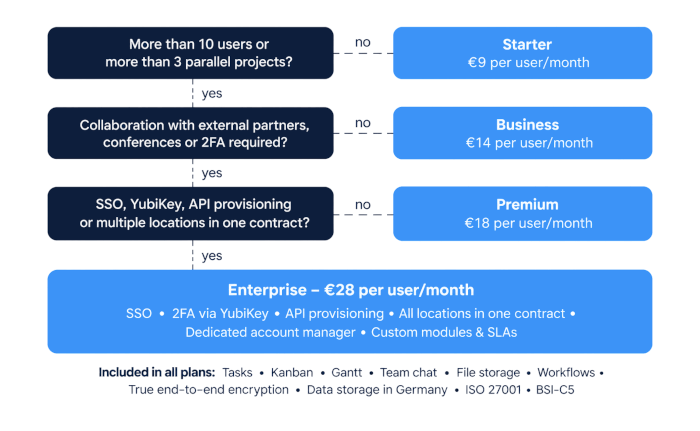
How to find the right plan in three steps
Choosing the right Stackfield plan comes down to three key decisions:
- Team size and workspace requirements: If your team has no more than ten users and needs up to three workspaces, Starter is sufficient. If you need more, Business is the next step, offering unlimited users and workspaces.
- Everyday collaboration: If you need internal video meetings, whiteboards, project portfolios, or collaboration with unlimited external users, Premium is the right fit. It also includes advanced security settings such as IP whitelisting and mandatory 2FA.
- Administration and governance: If your organization requires Single Sign-On, YubiKey authentication, API-based user provisioning, or multiple sub-organizations with centralized billing, Enterprise is the right choice.
Still unsure which features your team actually needs? The free 14-day trial is a great way to explore the platform. During the trial, you get access to all Premium features, including the Office and AI add-ons, although conferences are limited to three minutes. Enterprise features are only activated with an active subscription.
You can make changes at any time: Increase the number of licenses, upgrade to a higher plan, or add optional features whenever you need them. There is no minimum contract term and no cancellation notice period. Unless canceled, your subscription automatically renews for the selected billing period.
Save costs: One plan instead of four separate tools
Chat, video conferencing, file storage, and task management: Many teams use four separate tools for these functions, paying for each one individually on a per-user, per-month basis. On top of that, there's administrative overhead that also costs money: multiple contracts and invoices, separate user management for each tool, maintaining integrations between systems, and onboarding employees to each solution. Every additional provider also introduces another security risk that needs to be assessed and documented.
Stackfield brings task management, team chat, conferencing, and file storage together natively in one application. A single plan covers what other teams need multiple subscriptions for, while annual billing saves an additional 17% compared to monthly billing. Fewer tools also mean fewer integrations where information can get lost and a single point of contact when something isn't working.
Stackfield plans compared: One platform for teams of all sizes
Choosing a Stackfield plan is about finding the right balance between team size, security requirements, and growth plans. Since true end-to-end encryption, German data hosting, ISO 27001 certification, and BSI C5 attestation are included in every plan, the most secure option for a small team isn't necessarily the most expensive one. Find out which limits and access controls your team needs today, then start your trial with the plan that fits.
Ready to find the right plan for your team?
Starter, Business, Premium, or Enterprise: Get started today and bring tasks, communication, and files together in one tool that grows with your team.
Choose your Stackfield plan now
FAQ
Which Stackfield plan is best for a growing team of 15 to 30 employees?
For teams of 15 to 30 employees, the Starter plan is not an option due to its user limit. Business offers unlimited users and workspaces and provides sufficient functionality if your team primarily collaborates internally. Premium is worth considering if you work with external partners such as clients or freelancers, want to hold internal video meetings directly in Stackfield, or require mandatory two-factor authentication (2FA). For teams that collaborate extensively with guests, Premium is the more suitable choice because it allows unlimited external users.
Can public authorities meet BSI C5 requirements with Stackfield's Business or Premium plan?
Yes. Stackfield's BSI C5 attestation and ISO 27001 certification apply to the entire platform, regardless of the subscription plan, including Business. What differs between plans are the access controls: Single Sign-On and YubiKey-based 2FA are only available with Enterprise, while mandatory 2FA and IP whitelisting are included from Premium onwards. Many public-sector access control requirements therefore make Premium or Enterprise relevant, but the security certifications themselves apply to every plan.
What are the most important criteria when choosing a project management tool?
Four key criteria should guide your decision: team size, as this directly affects user limits and licensing costs; security requirements, including encryption, data hosting, and certifications; the level of integration, meaning whether tasks, communication, files, and conferencing are combined in one application or require multiple tools; and licensing costs relative to the features included. The same criteria apply when choosing a Stackfield plan: Team size and workspace requirements help determine whether Starter or Business is the right fit, while access controls and collaboration with external partners help determine whether Premium or Enterprise is more suitable.
How does Stackfield handle billing for multiple sub-organizations, such as a law firm with several offices?
With Starter, Business, and Premium, each office team needs its own subscription, meaning every organization is billed separately. Enterprise combines all sub-organizations under a single license package. Each user only needs one account and can switch between organizations without having to sign in multiple times. For organizations with numerous locations, this reduces administrative overhead and gives IT teams centralized control across all organizational units.
Can I change my Stackfield plan or add more licenses later?
Yes, at any time. You can increase the number of users, upgrade to a higher plan, or purchase additional add-ons during your subscription. When you expand your subscription, a new billing period begins. Any previously paid but unused subscription time is credited on a prorated daily basis toward your next invoice. There is no minimum contract term or cancellation notice period. Unless canceled, your subscription automatically renews for your selected billing period of either one month or one year.