The topic of artificial intelligence has gained rapid momentum, and there are already many ways to use AI in everyday work. Stackfield users will no longer need to leave the platform to benefit from this development. With the new AI assistant feature, you can now translate, correct, or refine content directly within any text field in Stackfield, all with the security and efficiency you expect from our company.
Secure AI that delivers real value
While many providers have rushed to integrate AI features, we at Stackfield first took a step back and conducted a thorough evaluation of artificial intelligence. There is an important reason for this: data and content security.
Data protection has been a top priority at Stackfield ever since the company was founded. All content created on our platform follows this principle, and AI is no exception. We want to ensure that artificial intelligence does not access user data without consent or use it as training material to derive insights from organizational content.
The result? An AI that finally meets high standards for data privacy and security.
Especially with international AI offerings, it cannot be ruled out that data may be used for training purposes without user consent. Our goal was therefore to integrate a solution where data remains within the EU and is not used to train models. By integrating AI technology from the German provider IONOS, we have achieved exactly that.
IONOS is not a new partner but has long been responsible for hosting Stackfield’s data exclusively in German data centers. For users, nothing changes in their familiar workflows. The integration is seamless within the existing environment.
Where can I find the new AI assistant feature?
The new AI assistant feature is available wherever a user can interact with others and / or enter text. This includes, for example, the communication module as well as comments in tasks or discussions.

The sparkle icon represents the new AI assistant features
The feature can be recognized by the
"sparkle" icon in the text input field controls.
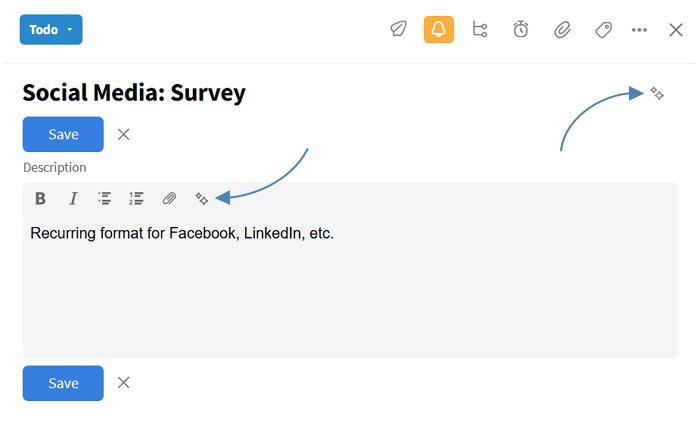
The AI feature is also available for task titles and in the task description.
What can I do with the AI feature?
The possibilities of AI are diverse, and the implementation reflects that. In this first step, we are fully focusing on how AI can support the editing of text content.
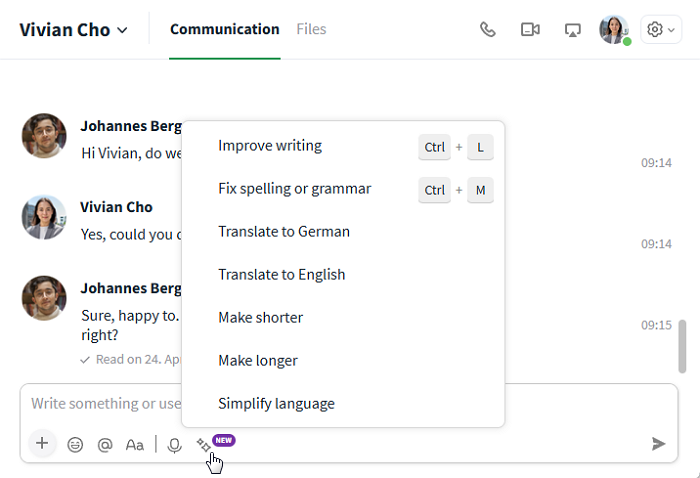
Overview of the new AI assistant functions
At launch, we focused on text editing. Here is an overview of the key features:
Improve writing:
This function optimizes the content of a message for readability and clarity. It can split long sentences, correct grammatical issues, and fix tense inconsistencies. It also corrects spelling errors.
The keyboard shortcut for this function is Ctrl + L.
Fix spelling or grammar:
This function fixes spelling mistakes without changing the existing sentence structure. It also corrects punctuation and special characters.
The keyboard shortcut for this function is Ctrl + M.
Translate to German:
This function translates any content into standard German.
Translate to English:
This function translates any content into English using American spelling.
Make shorter:
This function reduces the length of any content without losing the original meaning.
Make longer:
This function extends any content without changing its original meaning.
Simplify language:
This function replaces technical, foreign, or complex terms with more commonly used alternatives.
he AI features can be used in all areas where text can be entered. This includes not only chat, but also tasks, discussions, and subtasks. Existing content can also be translated directly via right-click, followed by "Translate to: (target language)".
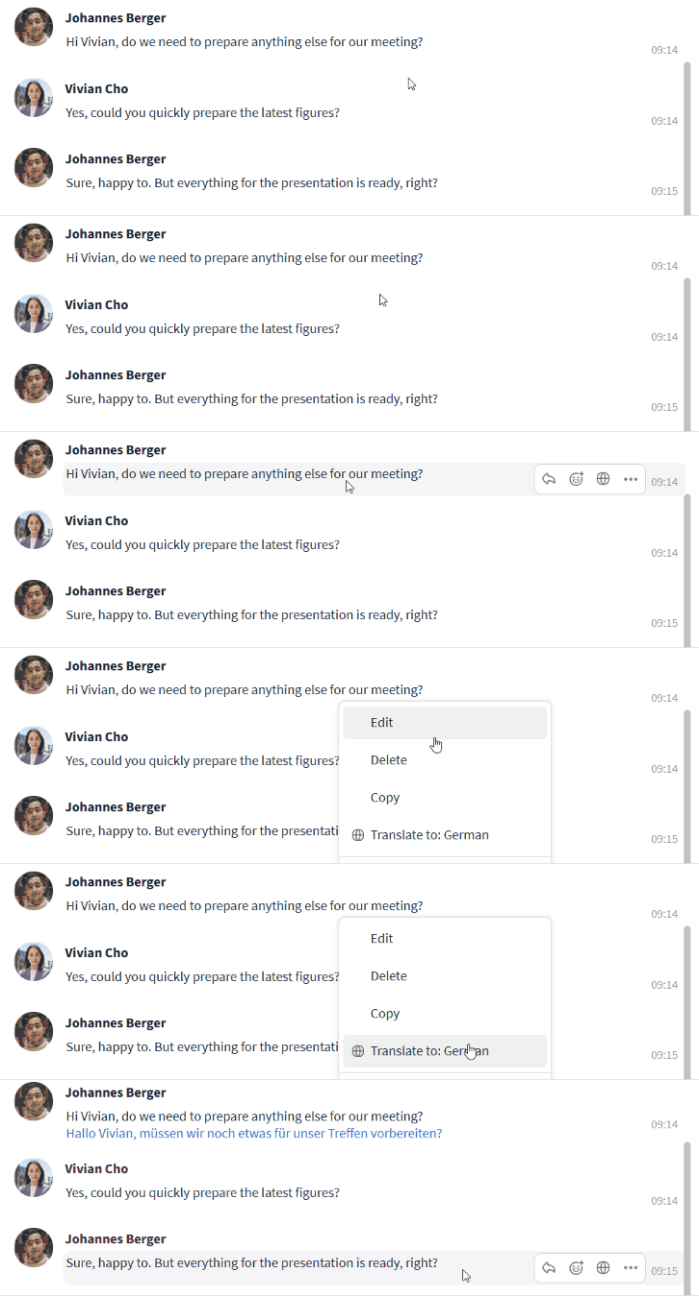
Existing texts can be translated directly
All functions can be used in any language. For example, French texts can be translated into German, Spanish content can be grammatically corrected, or the writing style of Japanese text can be improved. Users can also define a preffered target language in their account settings for translations.
Note: The processing always applies to the entire content in the text input field. If you only want to adjust specific sections, insert them separately.
What settings are available for the AI assistant feature?
The AI assistant feature can be configured individually for each user. The settings can be found in the user account, under the "Profile" tab in the section titled "Intelligent text processing".
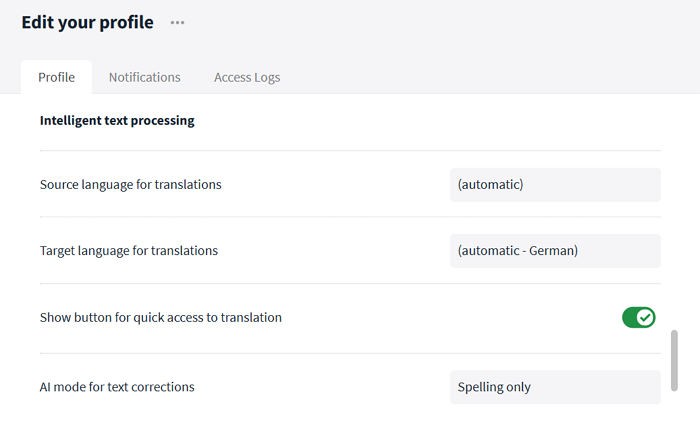
Configuration options for the AI assistant feature
The following settings are available:
Source language for translations:
This setting defines the language from which content should be translated. By default, "(automatic)" is enabled, allowing the AI to detect the source language on its own. Alternatively, a fixed source language can be selected. This is particularly useful when working regularly with multiple languages.
Tip: Regardless of this setting, texts can be inserted into Stackfield in almost any language and then translated, corrected, or optimized.
Target language for translations:
This setting defines the language into which content should be translated. By default, "automatic" is selected, translating texts into German. The target language can be customized via the dropdown menu.
The following target languages are available:
| Available target languages: |
| English |
German |
Spanish |
French |
| Portuguese |
Italian |
Swedish |
Norwegian |
| Danish |
Turkish |
Czech |
Polish |
| Slovak |
Romanian |
|
|
Show button for quick access to translation:
This option enables an additional translation button. By default, it is disabled (grey "X"). Once activated (green checkmark), an extra button appears when hovering over existing text, allowing content to be translated directly into the selected target language.
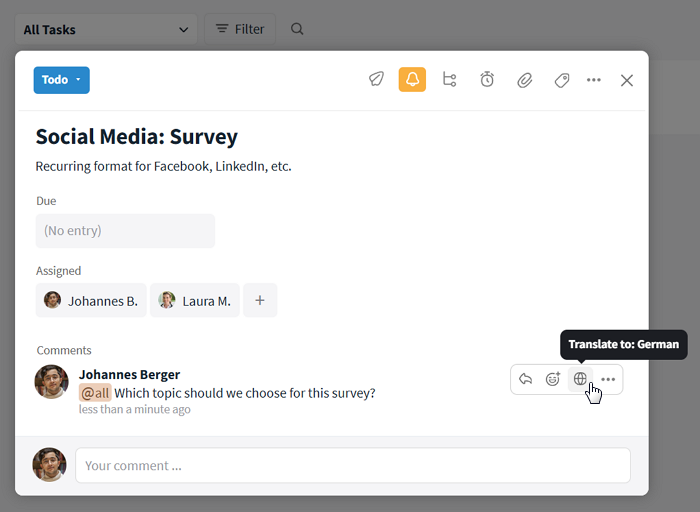
An optional additional translation button can be displayed
AI mode for text corrections:
Here you can choose between "Spelling only" and "Spelling and rewriting". This allows you to define whether only grammatical errors should be corrected or whether style and structure should also be improved. By default, "Spelling only" is enabled.
What do I get with the AI feature?
The new Stackfield AI can be added as an optional add-on to all plans. Each user provides the organization with 100,000 credits per month, with an average AI request consuming around 200 credits.
Credits are shared across the entire organization, and an overview is available in the organization settings under the "Statistics" tab. Additional credits can be purchased if needed. Unused credits expire at the end of each month.
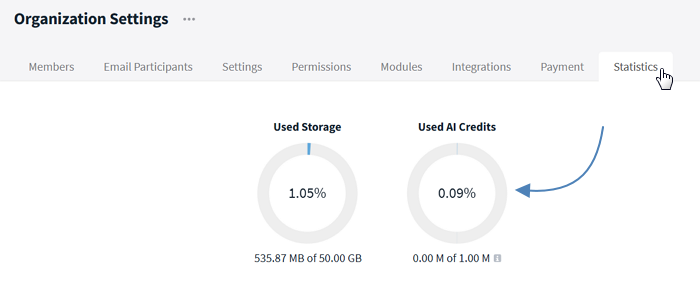
An overview of AI tokens can be found in the organization settings
More information is available HERE.
This is only the beginning
The AI assistant feature is a first step toward integrating artificial intelligence into Stackfield in a secure and efficient way. The goal is to provide features that noticeably improve everyday work while meeting the highest data protection standards. At the same time, we remain committed to preserving Stackfield’s clarity and simplicity.
We are not yet ready to reveal everything our IT team is currently working on. But we can already share this: In the future, we plan to introduce dedicated AI agents in Stackfield that not only support processes but also fully comply with European data protection standards.
Find out more about Stackfield AI HERE.