Monday.com is a solid tool, but not the best choice for every team. Whether it’s missing communication features, rising costs as your team grows, or data privacy concerns as a US-based provider, there are many reasons to switch. We’ve taken a closer look at the 9 most relevant alternatives, including a comparison table, pricing, and a GDPR check.
The essentials at a glance
- Keep costs in mind: The price of monday.com increases with the number of users and required features. Many core features such as time tracking or task dependencies are only available in higher-tier plans.
- Communication is separate: Monday.com does not offer a fully integrated chat or video solution like specialized tools, but includes basic communication features such as comments and updates. Additional tools are required for full team communication.
- Consider data privacy: EU hosting is only available with monday.com in the Enterprise plan, which is a relevant factor for organizations with strict GDPR requirements.
- Stackfield as an all-in-one solution: One of the few German solutions with true end-to-end encryption, integrated communication, and BSI C5 attestation, combining project management, chat, and document collaboration in one platform.
Why are more and more teams paying for monday.com features they don’t even use? Rising costs as teams grow, lack of integrated communication, and data privacy concerns related to international hosting are just three of the most common reasons why companies look for a monday.com alternative. At Stackfield, we understand the requirements of regulated industries and have analyzed the market for you. Here are the 9 best alternatives compared.
Why do companies switch from monday.com?
Monday.com is a cloud-based work management platform headquartered in Tel Aviv and New York. It often ranks among the top project management tools in many comparisons. However, it is not the best choice for every team.
Although monday.com offers a wide range of features, teams repeatedly encounter the same pain points in practice. The five most common reasons for switching are:
- Cost: Pricing increases disproportionately with the number of users. Key features such as time tracking or task dependencies are only available in higher-tier plans.
- Feature overload: The wide range of options can quickly become overwhelming. Less tech-savvy teams in particular may struggle with the interface.
- No integrated communication: Monday.com does not offer built-in chat or video calls. Teams need additional tools such as Slack or Zoom for collaboration.
- Data privacy concerns: Monday.com is an international provider headquartered in Israel, and depending on the infrastructure, US legal frameworks may also apply. Full EU data residency is only available in the expensive Enterprise plan.
- Integration dependency: Complete workflows require numerous external integrations, increasing both complexity and costs.
What matters when choosing an alternative?
Not every project management tool fits every team. Before choosing a solution, it is worth looking at the six most important evaluation criteria:
- Features: Does an all-in-one solution cover tasks, communication, and documents, or do you need multiple separate tools?
- Ease of use: How quickly can your team get started without weeks of onboarding?
- Data privacy & hosting: GDPR compliance, EU server location, and encryption standards determine the security of your data.
- Value for money: Are chat, video, and discussions integrated, or do you need an additional communication tool?
- Built-in communication: Chat, Video und Diskussionen direkt integriert oder ist ein zusätzliches Kommunikationstool nötig?
- Support: Multilingual, personally accessible, and not just a bot or ticket system.
With these criteria in mind, here are the 9 best alternatives to monday.com.
The 9 best monday.com alternatives in detail
Before taking a closer look at each tool, the following table provides a quick overview of all nine alternatives in direct comparison:
| Tool |
Free Plan |
DSGVO / Hosting |
Integrated real-time communication |
| Stackfield |
14-day trial |
✔ DE hosting, E2E, BSI C5 |
✔ Chat, video, discussions |
| ClickUp |
✔ Yes |
✖ US hosting |
Partial (chat) |
| Asana |
✔ Yes |
✖ US provider |
✖ No |
| Trello |
✔ Yes |
✖ US provider |
✖ No |
| Airtable |
✔ Yes |
✖ US hosting |
✖ No |
| Wrike |
✔ Yes |
✖ US provider |
✖ No |
| Microsoft |
Yes (limited) |
✖ US hosting |
✔ Teams |
| MeisterTask |
Yes (limited) |
✖ DE hosting via US hoster (limited E2E) |
✖ No |
| Teamwork |
Yes (limited) |
Partial |
✖ No |
1. Stackfield: all-in-one platform for project management and team communication
Stackfield is a German all-in-one platform that combines project management, team communication, and document collaboration in a truly end-to-end encrypted environment. With its all-in-one approach, teams can replace multiple standalone tools at once. This reduces costs, minimizes tool sprawl, and brings internal processes into a clear structure. At the same time, Stackfield meets the highest security standards for organizations with strict data privacy and compliance requirements.
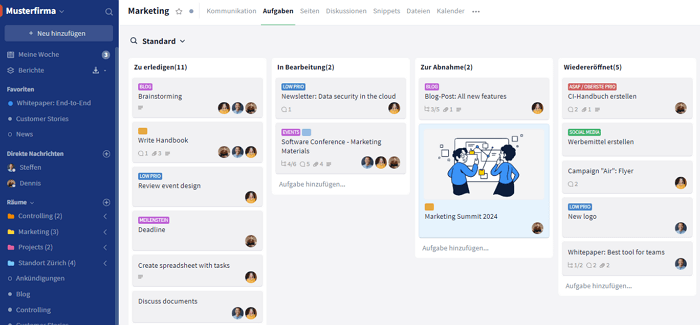
Core features: task and project management (Kanban, Gantt, lists), team chat and video conferencing, document management with version control, whiteboard, integrated calendar.
Strengths: True end-to-end encryption where not even Stackfield can access data, made in Germany with BSI C5 attestation and ISO 27001 certification, fully integrated communication, German-speaking personal support, no external tracking.
Limitations: The ecosystem of native third-party integrations is relatively limited. Common cloud storage services such as Google Drive, OneDrive, and Dropbox are directly integrated. For additional integrations, an API and Zapier are available.
Who is it for: Teams and organizations of all sizes that want to combine project management, communication, and document collaboration in one platform, as well as organizations with strict GDPR requirements.
Pricing: Starter from €9 per user per month, Business from €14 per user per month, Premium from €18 per user per month, and Enterprise from €28 per user per month when billed annually.
2. ClickUp: maximum flexibility for advanced users
ClickUp is a US-based productivity platform known for its flexibility and free plan. If you need full control over structures and task management, this tool offers a highly customizable solution.
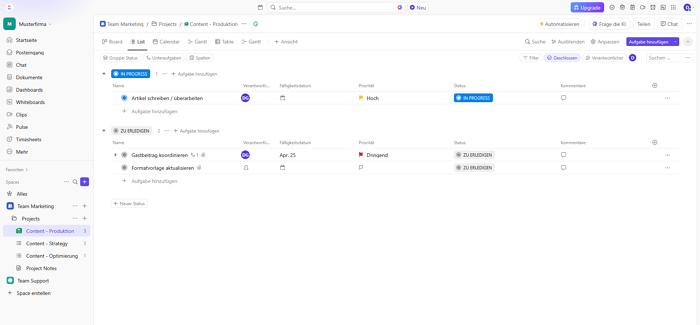
Core features: 15+ views, custom fields, automations, 1,000+ integrations, docs, whiteboards.
Strengths: High level of customization, free plan with unlimited tasks and users, strong automation features.
Limitations: US hosting without EU option, the interface can quickly feel overloaded.
Who is it for: Tech-savvy teams, developers, and teams working with agile workflows.
Pricing: Available across multiple plans including a free base version called "Free forever", as well as Unlimited, Business, and Business Plus. Pricing depends on various factors and detailed information is provided by ClickUp.
3. Asana: Structured project management for growing companies
Asana is one of the more established project management tools and stands out with its intuitive task structure and workflow automation. It is a strong choice for teams that want to map clear processes.
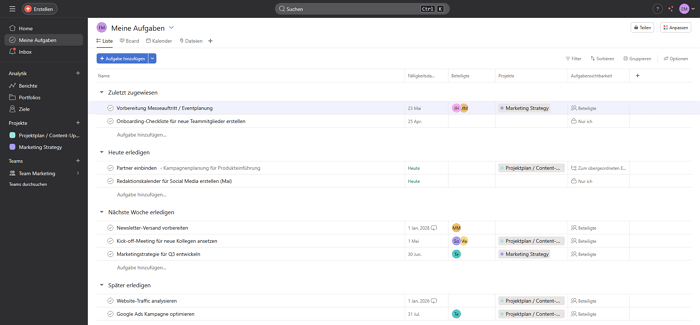
Core features: Timeline, rules and automations, portfolios, forms, reporting.
Strengths: Intuitive task structure, workflow automation, process-driven approach.
Limitations: No integrated chat, US provider, becomes expensive with larger teams.
Who is it for: Marketing and operations teams with clearly defined processes.
Pricing: Personal as a free base version, Starter from approx. €11 per user per month, Advanced from approx. €24.99 per user per month, and Enterprise pricing available on request. Additional add-ons may increase the total cost.
4. Trello: visual Kanban for an easy start in project management
Trello is the simplest tool in this comparison. If you are looking for straightforward task management as a Kanban board solution without a steep learning curve, this is a great fit. The Kanban principle with boards, lists, and cards can be understood in minutes.
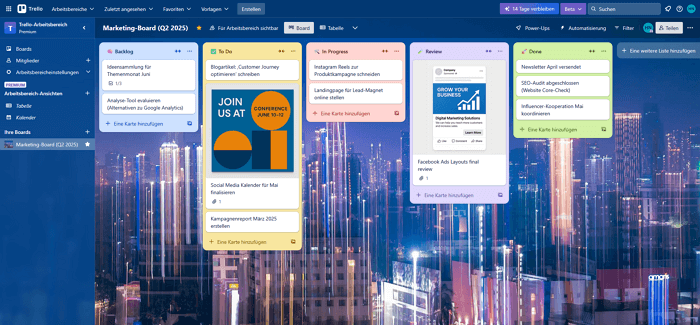
Core features: Boards, lists, cards, Power-Ups for extensions.
Strengths: Very easy to use, ready to go immediately, free plan available.
Limitations: Limited reporting, does not scale well for complex projects. Advanced views such as timeline or calendar are only available in higher-tier plans.
Who is it for: Small teams, freelancers, simple task lists.
Pricing: Free for up to 10 users per workspace, Standard from approx. $5 per user per month, Premium from $10 per user per month, and Enterprise from $17.50 per user per month when billed annually.
5. Airtable: where project management meets databases
Airtable is a hybrid between a relational database and a project management tool. For teams that need to manage data-intensive workflows or complex data models, Airtable offers the required flexibility.
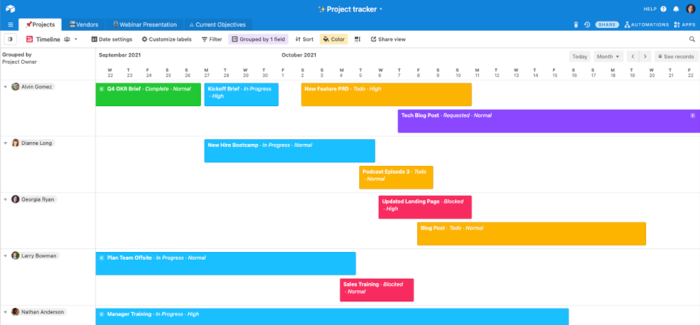
Core features: Relational databases, flexible views such as grid, Kanban, gallery, and calendar, automations, powerful API.
Strengths: Advanced data structures, flexible data models, strong API capabilities.
Limitations: Not a traditional project management tool, complex setup, US hosting, relatively high pricing.
Who is it for: Data-intensive workflows, CMS-like applications, editorial teams.
Pricing: Free plan available, Team from $20 per user per month, Business from $45 per user per month when billed annually, and Enterprise Scale pricing available on request.
6. Wrike: enterprise project management with strong reporting
Wrike positions itself as an enterprise project management solution with strengths in resource planning, reporting, and approval workflows. For large organizations with complex projects, Wrike offers the necessary depth.
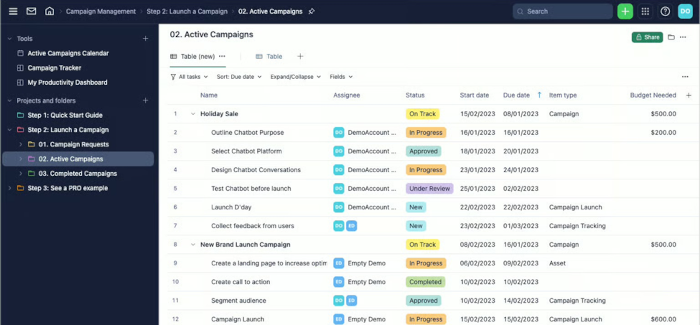
Core features: Gantt charts, resource planning, reporting dashboards, proofing and approval workflows.
Strengths: Resource management, reporting and analytics, approval workflows for creative teams.
Limitations: High setup effort, expensive in higher-tier plans, US provider.
Who is it for: Large organizations that need advanced resource management or tools for highly complex projects and are willing to invest in setup and configuration.
Pricing: Free plan available, Team from $10 per user per month, Business from $25 per user per month, Pinnacle and Apex pricing available on request.
7. Microsoft Teams & Project: the Microsoft ecosystem
Microsoft Teams and Microsoft Project are already widely used in many organizations. As part of the Office 365 bundle, they are a familiar working environment for many teams. If you are switching from monday.com and already rely on Microsoft, this option is often considered a logical next step.
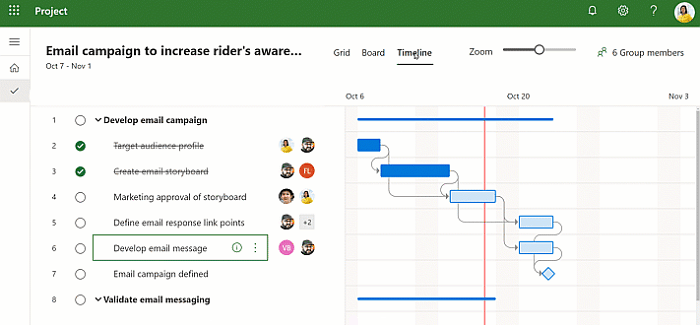
Core features: Gantt charts and scheduling in Project, team chat and video conferencing in Teams, Office integration, resource planning.
Strengths: Seamless integration into the Microsoft ecosystem, Teams already included in many Office 365 plans, familiar interface for existing Microsoft users.
Limitations: No true end-to-end encryption, US provider with CLOUD Act implications, Teams is primarily a communication tool and not a full project management solution, Microsoft Project is only available in higher-tier plans.
Who is it for: organizations already deeply embedded in the Microsoft ecosystem. For public sector organizations, law firms, or other entities with strict GDPR requirements, Microsoft may not be the best choice due to CLOUD Act concerns. Many teams complement it with Stackfield for more advanced project management, structured task management, and end-to-end encrypted collaboration.
Pricing: Microsoft Planner (including Project) starts at approximately €8.70 per user / month (Plan 1), while Project Plan 3 starts at approximately €26.00 per user / month when billed annually. Additional Enterprise plans and custom pricing may be available on request. Microsoft Teams is included with many Microsoft 365 plans but can also be licensed separately for approximately €3.50 to €6.00 per user / month.
8. MeisterTask: GDPR-compliant alternative from Germany
MeisterTask is a German project management tool that stands out with EU hosting and GDPR compliance. It provides a solid entry point for teams that value data protection but do not require the full feature set of larger platforms.
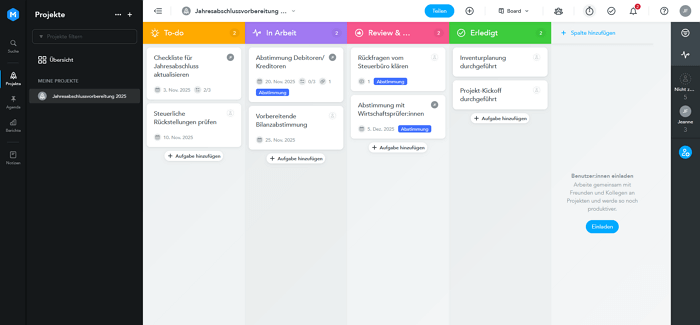
Core features: Kanban boards, automations, time tracking, integrations.
Strengths: GDPR-compliant, German-language support, easy onboarding.
Limitations: More limited feature set compared to larger platforms, no integrated audio or video conferencing, no true end-to-end encryption.
Data privacy comparison with Stackfield: GDPR-compliant and hosted in Germany, but without true end-to-end encryption and without BSI C5 attestation. This may not be sufficient for organizations with the highest security requirements.
Who is it for: SMEs with GDPR requirements that need less feature depth.
Pricing: Free plan with limitations, Pro from €13.50 per user per month, Business from €24 per user per month when billed annually, and Enterprise pricing available on request.
9. Teamwork: strong for client projects and billing
Teamwork is a specialized solution for agencies and service providers that need to manage and bill client projects. The tool combines classic project management with features for time tracking, budgeting, and client management.
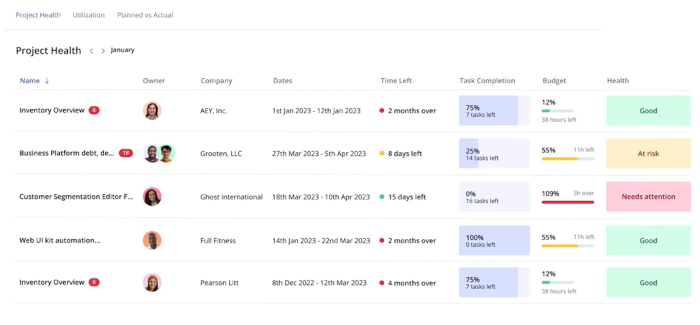
Core features: Time tracking, invoicing and budgeting, client management, resource planning.
Strengths: Built-in billing features, client management, integrated time tracking.
Limitations: Less intuitive than comparable tools, Teamwork is a US provider.
Who is it for: Agencies, service providers, consultancies, teams managing client projects with time tracking and billing.
Pricing: Basics from €9.99 per user per month, Accelerate from €24.99 per user per month when billed annually, Optimize and Enterprise pricing available on request.
Which monday.com alternative is right for you?
The right choice depends on your specific needs. This guide shows at a glance which project management tool best fits your team:
- Data privacy, integrated communication, and full project management in one platform → Stackfield
- Flexibility and a wide range of integrations → ClickUp
- Process-driven work with workflow automation → Asana
- Small team, quick start without onboarding → Trello
- Data-intensive workflows and complex data models → Airtable
- Client projects with time tracking and billing → Teamwork
- GDPR-compliant, but a lean feature set is sufficient → MeisterTask
If you want to combine project management, communication, and data privacy in an all-in-one solution, Stackfield is the most comprehensive alternative.
Which monday.com alternative is right for you?
The right choice depends on your specific needs. This guide shows at a glance which project management tool best fits your team:
- Data migration: Monday.com offers CSV exports and an API for data export. However, automations, custom views, and integrations are not transferred and must be set up again in the new tool.
- Contract terms: Check cancellation periods and billing cycles with monday.com in advance to avoid paying for two tools at the same time.
- Onboarding effort: How quickly can the new project management tool be used? Look for providers that offer guided onboarding to make the transition easier for your team.
- Integration check: Create a list of all existing integrations such as Slack, Google, or email connections. Clarify early which of these are available in the new tool or need to be reconfigured.
- Personal migration support: Stackfield actively supports the entire onboarding process with multilingual assistance. The team helps with data migration and ensures a smooth transition to Stackfield.
Ready for a monday.com alternative that takes data privacy seriously? Stackfield combines project management, team chat, and document collaboration in a truly end-to-end encrypted platform – made in Germany.
Start your 14-day free trial now
FAQ
What sets Stackfield apart from monday.com?
Stackfield offers true end-to-end encryption, German hosting with BSI C5 attestation, and integrated communication features such as chat and video. Monday.com is an international provider without integrated communication and only offers EU hosting in its Enterprise plan.
Which monday.com alternatives actually store data in the EU?
Stackfield and MeisterTask host data in Germany. With ClickUp, Asana, Trello, Microsoft, and Airtable, data is stored on US servers. Guaranteed EU data residency without exceptions with monday.com is only available in the Enterprise plan.
Can I export my data from monday.com?
Yes, monday.com offers CSV exports and an API. However, automations, views, and integrations cannot be transferred directly and need to be set up again in the new project management tool.
How complex is switching to a new project management tool?
This depends on team size and complexity. Simple migrations can take a few days, while more complex setups may take two to four weeks. Providers like Stackfield offer personal onboarding support to ensure a smooth transition.
Why is Stackfield the better choice for GDPR-sensitive organizations?
Stackfield is one of the few alternatives with true end-to-end encryption, BSI C5 attestation, and ISO 27001 certification. All data is stored on German servers, and not even Stackfield itself has access to customer data.