Your team is torn between two very different approaches: On one side is Notion, a workspace built around pages and databases that everyone can customize to suit their needs. On the other is Stackfield, a dedicated project management tool with true end-to-end encryption. Both are marketed as all-in-one solutions, but their underlying approaches couldn't be more different. Four criteria can help you make the right decision: security and data protection, comprehensive project management capabilities, integrated team communication, and flexibility and knowledge management. This comparison evaluates both tools against these four criteria.
The essentials at a glance
- Different approaches: Stackfield is a dedicated project management and collaboration platform, while Notion is primarily a flexible document and database workspace with task management layered on top.
- Security is the dividing line: Only Stackfield offers true end-to-end encryption and exclusively EU-based data hosting. Notion hosts data in the US by default, with EU data residency available only on the Enterprise plan.
- Built-in communication matters: Stackfield integrates chat, audio calls, and video conferencing directly into the platform. Notion doesn't offer native equivalents.
- Why consider Stackfield: Teams looking for project management, communication, and compliance in a single tool without compromises can try Stackfield free for 14 days.
Experience project management without compromises Tasks, chat, and video conferencing – all in a truly end-to-end encrypted environment, hosted in Germany and fully compliant with the GDPR.
Get started securely
Company overview: Stackfield vs. Notion
Notion and Stackfield were founded around the same time, but their origins couldn't be more different. Stackfield is a German company that has grown organically without external funding and operates its entire infrastructure in Germany. Notion is a US-based company that has expanded through multiple rounds of venture capital funding. These different backgrounds are reflected in their security architectures: Both hold a BSI C5 attestation and ISO 27001 certification, but they differ significantly in who can access customer data and where that data is stored.
| Feature |
Stackfield |
Notion |
| Founded |
2012 |
2013 |
| Headquarters |
Munich, Germany |
San Francisco, USA |
| Funding |
Bootstrapped and organically grown |
Venture capital-backed |
| Infrastructure |
Servers and subprocessors located exclusively in Germany / the EU |
Default hosting in the US; EU data residency available only on Enterprise |
| True end-to-end encryption |
Yes, even Stackfield itself cannot access encrypted content |
No, the provider can access content |
| Security certifications |
ISO 27001, BSI C5, ISO 27017, ISO 27018 |
ISO 27001, BSI C5, SOC 2 Type II |
| Starting price |
From €9 / user / month (chat, tasks, Gantt; video conferencing from Premium at €18); minimum 5 users |
Free plan with feature limitations; Plus from €9.50 / user / month (billed annually) |
Stackfield vs. Notion: Feature-by-feature comparison
This comparison examines nine key feature areas, highlighting what Stackfield offers out of the box, what Notion supports natively, and where Notion relies on third-party integrations or custom-built workarounds. After all, there's a crucial difference between a tool being able to do something and being able to do it natively – especially in day-to-day work.
Kanban boards, Gantt charts, and list views
Notion offers native Kanban boards and list views. However, what Notion refers to as a Gantt view is essentially a database timeline: Bars can be moved and extended using drag and drop, but task dependencies (predecessor/successor relationships with automatic rescheduling) and critical path calculations are not supported. This works well enough for simple chronological overviews, but falls short when it comes to traditional project planning with dependencies.
Stackfield includes Kanban boards, Gantt charts with real task dependencies and critical path calculations, network diagrams, and list views in every plan. All views work with the same underlying tasks, so there's no need for exports or workarounds when switching between Kanban and Gantt.
| Feature |
Stackfield |
Notion |
Implementation in Notion |
| Kanban board |
✔ |
✔ |
Native |
| Gantt chart |
✔ |
⚠ |
Timeline database view with drag and drop, but without task dependencies or critical path calculations |
| List view |
✔ |
✔ |
Native |
Legend:
✔ = Available
✖ = Not available
⚠ = Limited functionality or requires third-party integrations.
Project portfolio management
Notion doesn't have a dedicated project portfolio management feature. Teams looking to manage and compare multiple projects simultaneously have to build their own system using linked databases and dashboards. While this offers flexibility, it also requires considerable setup and maintenance, along with a consistent data structure that the entire team must follow.
Stackfield includes a native portfolio module that brings all ongoing projects together in a single overview, giving teams instant visibility into project status, deadlines, workloads, and dependencies. Organizations with multi-project management requirements can skip the custom setup entirely. The module is available from the Premium plan onwards.
| Feature |
Stackfield |
Notion |
Implementation in Notion |
| Project portfolios |
✔ |
⚠ |
Custom-built linked databases / dashboards |
Time tracking
Notion doesn't offer native time tracking. Teams that need to track working hours must rely on external tools or third-party widgets connected through integrations.
Stackfield integrates time tracking directly into every task and project. Team members can log time manually or start a timer, while daily and weekly overviews show exactly where their time has gone. Timesheets can also be exported for project billing or internal reporting.
| Feature |
Stackfield |
Notion |
Implementation in Notion |
| Time tracking |
✔ |
✖ |
Only through third-party widgets / integrations |
Workflows and automation
Notion offers native database automations: Event-based triggers such as "Page added" or "Property edited" can initiate actions like creating or editing pages. However, scheduled or recurring automations aren't covered by these capabilities and require Zapier, Make, or the Notion API.
Stackfield supports both types natively: event-based triggers and recurring workflows that run automatically at scheduled times. Both can be configured without external tools and operate entirely within the end-to-end encrypted environment.
| Feature |
Stackfield |
Notion |
Implementation in Notion |
| Event-based automations |
✔ |
✔ |
Native |
| Scheduled / recurring workflows |
✔ |
✖ |
Only through Zapier / Make |
Group chat and direct messaging
Notion doesn't offer native chat functionality. Team communication takes place through comments on pages and database entries. While these are useful for providing quick feedback on specific documents, they're no substitute for proper group chat or direct messaging between colleagues. Real-time communication requires external tools such as Slack.
Stackfield treats team communication as a core feature: Group chats for rooms and teams, direct messages between individuals, and topic-specific discussions that can be separated from chats into dedicated threads. Everything takes place in the same end-to-end encrypted environment as tasks and files.
| Feature |
Stackfield |
Notion |
Implementation in Notion |
| Group chat and direct messaging |
✔ |
✖ |
Not available; comments only |
Audio and video conferencing, including screen sharing
Notion doesn't include native conferencing capabilities in any of its plans. Audio and video calls, screen sharing, and meetings require external tools such as Zoom, Google Meet, or Microsoft Teams. That means another subscription, another application, and another integration.
Stackfield integrates one-to-one calls directly into the platform, while group conferences with audio, video, and screen sharing are available from the Premium plan onwards. Meetings happen right where tasks and files are managed, eliminating the need to switch between tools and ensuring that conversations stay within the end-to-end encrypted environment.
| Feature |
Stackfield |
Notion |
Implementation in Notion |
| Audio and video conferencing |
✔ (group calls from Premium onwards) |
✖ |
Not available |
| Screen sharing |
✔ |
✖ |
Not available |
Wikis and knowledge management
This is an area where Notion particularly excels. Nested pages and subpages, databases, verified pages, and knowledge base functionality make it a powerful knowledge management tool. Content can be organized freely, linked together, and managed separately across different teamspaces. Anyone looking to build a flexible company wiki will find plenty of options in Notion.
Stackfield provides knowledge management through wiki pages that sit alongside tasks and files in the same room. Its approach is more integrated: Documentation is created where work actually happens, so teams don't have to switch between a separate wiki tool and their project workspace. This is an advantage for teams that see knowledge management as part of their project workflows. However, organizations looking for a standalone, highly customizable wiki system may be better served by Notion.
| Feature |
Stackfield |
Notion |
Implementation in Notion |
| Wiki pages |
✔ |
✔ |
Native; a core strength |
| Nested page structure |
✔ |
✔ |
Native; highly customizable |
File management and Office collaboration
In Notion, files are stored as attachments within pages. There is no dedicated folder structure or standalone file management system. Office documents (.doc, .xls, .ppt) cannot be edited directly. They can be embedded from Google Drive or other services, but the actual files remain outside Notion.
Stackfield offers a complete file management system with a folder structure built directly into the platform. With the Office add-on (+€2.40 / user / month, available from Premium), teams can create Office documents in Stackfield and collaborate on them in real time, without files leaving the end-to-end encrypted environment. For teams that want to keep document collaboration and project management in one place, this eliminates the need for external services.
| Feature |
Stackfield |
Notion |
Implementation in Notion |
| File management with folders |
✔ |
⚠ |
Attachments within pages only |
| Simultaneous editing of Office documents |
✔ (Office add-on, from Premium, +€2.40 / user / month) |
✖ |
Only through third-party embeds / link previews |
Security, data residency, and certifications
Notion encrypts data at rest using AES-256 and protects data in transit with TLS 1.2 or higher. However, Notion can access customer content as the service provider. It doesn't offer end-to-end encryption. By default, data is hosted on US servers, with EU data residency available only on the Enterprise plan. Notion holds ISO 27001, BSI C5, and SOC 2 Type II certifications and attestations.
Stackfield encrypts all content directly on the user's device using a combination of AES and RSA algorithms before it leaves the device. Not even Stackfield itself can access messages, files, or tasks. Data hosting and subprocessors are located exclusively in Germany and the EU across all plans. Stackfield holds ISO 27001, BSI C5, ISO 27017 and ISO 27018. For teams in regulated industries or those subject to GDPR and critical infrastructure (KRITIS) requirements, this is the defining difference.
| Feature |
Stackfield |
Notion |
Implementation in Notion |
| True end-to-end encryption |
✔ |
✖ |
AES-256 encryption at rest only; the provider can access content |
| Data hosted exclusively in Germany / the EU |
✔ |
⚠ |
US hosting by default; EU data residency only on Enterprise |
| Subprocessors exclusively in Germany / the EU |
✔ |
✖ |
International subprocessors |
| ISO 27001 and BSI C5 |
✔ |
✔ |
Certified / attested |
Pricing comparison: Stackfield vs. Notion
| Plan |
Stackfield |
Notion |
| Entry-level |
Starter: €9 / user / month (chat, tasks, Gantt; video conferencing from Premium); minimum 5 users, maximum 3 rooms and 10 users |
Free plan: Free of charge, but limited in terms of content, uploads (max. 5 MB), page history (7 days), and features |
| Mid-tier |
Business: €14 / user / month (unlimited rooms and users) |
Plus: €9.50 / user / month (billed annually) |
| Full-featured |
Premium: €18 / user / month (including video conferencing, portfolios, and whiteboards) |
Business: €19.50 / user / month (billed annually); full AI capabilities only available from this plan |
| Enterprise |
€28 / user / month |
Custom pricing |
The key difference isn't the list price, but what's included in each plan. Stackfield's Starter plan comes with chat, tasks, Kanban boards, Gantt charts, and time tracking from day one. Notion's full AI capabilities, including Agents and Ask Notion, are only available on the Business plan. Video conferencing isn't included in any Notion plan.
Comparing the strengths of Stackfield and Notion
Where Notion has the advantage
- Exceptional flexibility: Free-form pages, nested databases, and templates can be adapted to virtually any use case, from note-taking to custom-built CRM-like systems.
- Easy to get started: A free plan with no time limit or minimum user requirement makes Notion accessible to individuals and very small teams, while Stackfield requires a minimum of five licenses.
- Large community: Thousands of community templates and third-party extensions, including options for whiteboards and Gantt views, allow teams to expand the platform's capabilities as needed.
Where Stackfield has the advantage
- True end-to-end encryption: Stackfield is the only tool in this comparison that encrypts content end to end between devices. Not even Stackfield itself can access this content.
- Comprehensive native project management: Kanban boards, Gantt charts, network diagrams, project portfolios, and time tracking work out of the box without custom-built workarounds.
- Fully integrated communication: Chat, direct messaging, and audio and video conferencing with screen sharing eliminate the need for additional messaging or conferencing licenses.
- Data hosting in Germany and the EU: Servers and subprocessors are located exclusively in Germany and the EU across every plan, rather than being restricted to Enterprise as with Notion.
- Personal support in German: Stackfield provides support by phone, email, and live chat without chatbots. Notion offers support through an in-app button, with dedicated premium support available only on Enterprise. Notion doesn't list telephone support as an option.
To see how task management, team communication, and true end-to-end encryption work together in Stackfield, explore the complete Stackfield feature overview.
Which tool is right for your team?
Who should choose Notion?
Small teams and individuals who primarily need a flexible knowledge base with lightweight task tracking, and who aren't subject to strict EU data protection requirements, can benefit from Notion's adaptability. Freelancers looking to manage projects, notes, and client information in a highly customizable workspace, as well as early-stage startups still experimenting with their processes, will find a tool that adapts to their preferred way of working.
Who should choose Stackfield?
Teams in the public sector, healthcare, or financial services that need to meet GDPR, KRITIS, or BSI C5 requirements will find that Stackfield is the only solution in this comparison combining true end-to-end encryption with exclusively European data hosting. Organizations looking to reduce tool sprawl and bring project management, chat, video conferencing, and file collaboration together on one platform – rather than paying for four separate solutions – can streamline both collaboration and compliance assessments in a single step.
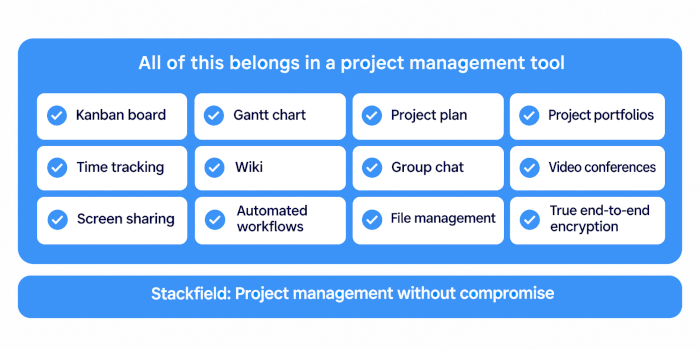
Stackfield vs. Notion: Built-in security versus added-on protection
Notion and Stackfield solve different problems. Notion is a powerful knowledge management and documentation tool that can be adapted to a wide range of use cases with the right configuration. Stackfield, by contrast, was designed from the ground up as a complete work management platform. Project management, team communication, and data security are seamlessly integrated from the start, without requiring teams to build their own solutions.
For organizations looking to address security, data protection, and tool consolidation at the same time, Stackfield offers a more straightforward solution: true end-to-end encryption, EU-based data hosting, and integrated chat with video conferencing from the very first plan.
Ready for a tool that doesn't make you choose? Stackfield combines project management, communication, and collaboration in a single platform, with true end-to-end encryption and BSI C5 attestation.
Switch to GDPR-compliant collaboration
FAQ
Which German or European alternatives to Notion are suitable for teams with strict data protection requirements?
Stackfield offers the strongest data protection profile among the alternatives: true end-to-end encryption, ISO 27001, BSI C5, ISO 27017, and ISO 27018, headquarters in Munich, and data hosting and subprocessors located exclusively in Germany and the EU. Notion meets basic GDPR requirements but stores data in the US by default. EU data residency is only available on the Enterprise plan.
Can I migrate an existing Notion workspace to Stackfield?
Yes. Notion allows you to export content as Markdown or CSV files, which can then be imported into Stackfield. The workspace structure can be rebuilt using rooms, tasks, wiki pages, and files. Stackfield's Customer Success team provides German-language support throughout the migration process. You can also start gradually with a pilot room, using the 14-day free trial to set up your initial workspace.
Can Notion's Timeline view fully replace a Gantt chart with task dependencies?
No. Notion's Timeline view supports drag and drop but doesn't provide task dependencies with automatic rescheduling or critical path calculations. It's suitable for simple project overviews, but not for comprehensive project planning. Stackfield's native Gantt chart includes task dependencies, milestones, and network diagrams out of the box.
Which tool is better suited to government agencies and critical infrastructure operators: Stackfield or Notion?
Both hold a BSI C5 attestation, but that's where the similarities end. Stackfield's data hosting and subprocessors are located exclusively in Germany and the EU across all plans. Notion hosts data on US servers by default, with EU data residency available only from Enterprise. Stackfield also provides true end-to-end encryption, which Notion doesn't offer. Learn more: Project management software for critical infrastructure.
Can I use Notion and Stackfield side by side to separate knowledge management from project management?
Technically, yes, but it rarely makes sense. Using two tools means paying for two licenses, managing two privacy policies, and maintaining two separate places where decisions and information can become disconnected. Stackfield integrates wiki pages and knowledge management into the same environment as tasks, chat, and files. Documentation is created exactly where the work happens.
What sets Stackfield apart from other German project management tools?
Stackfield combines true end-to-end encryption with comprehensive native project management (Kanban boards, Gantt charts, portfolios, and time tracking) and integrated team communication. Other German tools, such as Factro or MeisterTask, offer data protection compliance but not end-to-end encryption at the same level. For organizations looking to meet all three requirements within a single platform, Stackfield provides the most comprehensive solution.