Stackfield is continuously being developed to make collaboration for teams even easier and more efficient. With the latest integration, this goal is not only advanced further, but a frequent request from many users is also fulfilled: the option to edit Office documents directly in Stackfield. This is made possible by the software Collabora.
Collabora has been integrated into Stackfield’s infrastructure, so the familiar high standard of data protection and information security is maintained. The most important point: this integration does not involve any transfer of data to Collabora.”
Which features does the new integration offer?
With the Collabora integration, Stackfield users can create, format, view, and, if needed, collaboratively edit office documents directly within the platform. The full range of functions known from established office solutions is available, from text and spreadsheet documents to presentations.
Creating new documents
With the Collabora integration, documents can now not only be uploaded to Stackfield, but also created directly in the platform.
This is possible anywhere a file can be attached in Stackfield, for example in the "Communication" module, in comments, and of course in the "Files" module. These new documents are generated in the formats DOCX, XLSX, and PPTX.
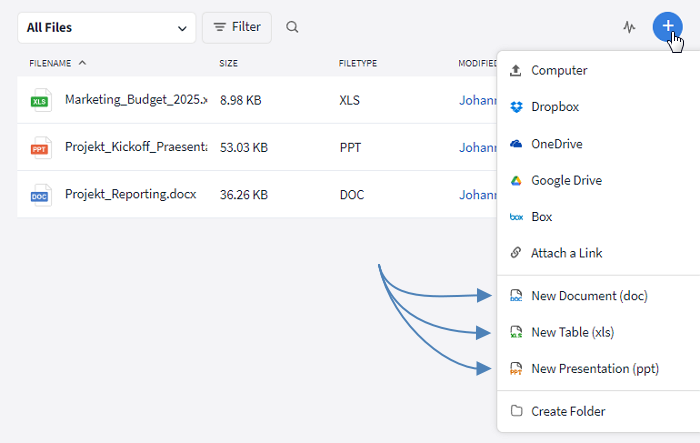
For example, office documents can be created in the "Files" module
Editing documents live
The core of the Collabora integration is live editing of documents directly in Stackfield, regardless of whether an additional license is available. DOC, XLS, and PPT files, as well as many other formats such as ODT, can be edited in Stackfield with a feature set that easily keeps pace with existing office suites.
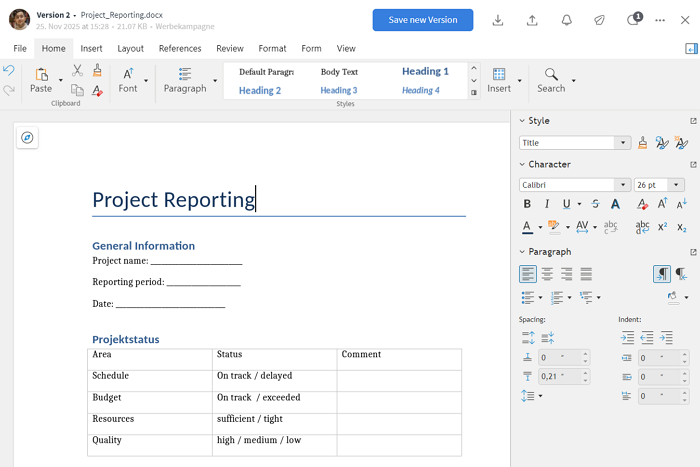
The editing options are comparable to other office suites
Working within the documents is almost identical to using desktop office suites. Content can be adjusted and designed as needed, regardless of whether documents were created in Stackfield or uploaded to the platform.
In addition, all benefits of working with documents in Stackfield continue to apply, such as integrated document versioning.
Collaborative editing
All files that can be edited via live editing can be opened and edited by multiple people at the same time.
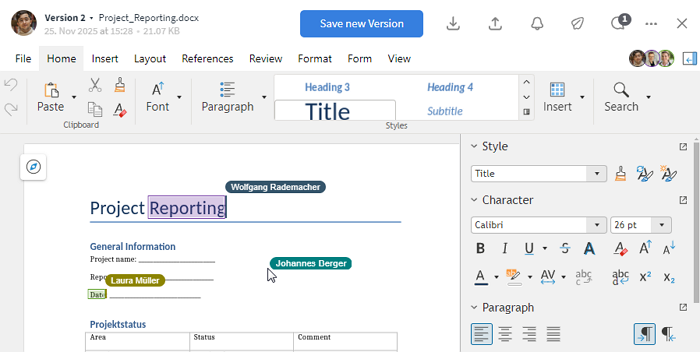
Multiple people can edit an office document at the same time
This makes it possible to create, revise, or expand content together, for example when drafting texts, working jointly on spreadsheets or aligning presentation content.
What are the benefits of the Collabora integration?
Uploading and downloading documents, opening, reading, adding notes, and sharing them has been possible in Stackfield for a long time. With the Collabora integration, document handling is taken to a new level. All steps, from creation and editing through to shared review and alignment, can now take place within a single platform. This reduces context switching, saves time, and brings clear structures to everyday work.
Despite the new capabilities, Stackfield remains as convenient and secure as ever. All data continues to be stored exclusively in Germany, and the existing encryption architecture ensures that sensitive content stays protected at all times. This expands collaborative document work with new possibilities, without compromising on data protection or security.
And even without the add-on, the familiar functionalities in Stackfield remain available. These include, for example, local document editing as well as automatic file versioning.
Try the Collabora integration for free
Our new Add-on can be tested free of charge in Stackfield, both by existing Stackfield users as well as by new users. To do so, a cost-free trial organization can simply be created. In this trial organization, the office integration is enabled for the full two-week trial period and can be explored in detail and used productively.
How existing users create a trial organization
- In the Stackfield sidebar below the organization name, click "+ Create New".
- Select the option "New Organization..." (at the very bottom of the list).
- Choose an organization name and, if desired, invite initial team members right away.
Afterwards, the new organization can be opened via the organization overview. Switching between organizations is possible at any time.
How new users create a trial organization
- Open the Stackfield registration form.
- Enter login details and organization information.
A new trial organization is then created, in which, alongside other features, the add-on can be tested as desired for two weeks.
Why is this integration offered as a paid add-on?
As already mentioned, editing office documents in Stackfield relies on Collabora’s technology. This solution involves licensing fees on our side, which Collabora charges for the use of its software.
To keep the base costs for all Stackfield users, the integration is offered as an optional add-on. This ensures that the feature is available exactly where it is needed – for users who want to actively edit documents in Stackfield.
In this way, the overall offering remains lean and transparent. Anyone who does not need the add-on does not pay for it. On the other hand, users who choose the add-on can save the licensing costs for any office suites already in use, as duplicate licensing is not necessary.
Almost finished...Please click the link in the email and confirm your email adress to complete the subscription process.
Never miss a post. Get awesome insights in your inbox.