Slack channels open, a Teams notification flashing, an approval waiting in your inbox, and your project management tool running in parallel. A decision has been made, but nobody remembers where. This is where the real question begins: Will the next chat tool solve the problem, or simply add another layer to the growing tool sprawl? Stackfield brings communication, tasks, and files together in a single ISO 27001-certified German platform, reducing information overload instead of creating yet another source of it.
The essentials at a glance
- Microsoft Teams and Slack come with limitations: US-based data hosting, no true end-to-end encryption, and task management capabilities that rely on add-ons or templates.
- Nextcloud and factro serve specific niches: Nextcloud is geared toward technically skilled teams with a self-hosting focus, while factro is designed for project-driven teams that view chat as a supplementary feature.
- A chat tool alone is often not enough: Adding another messenger does not replace task management, file storage, or video conferencing, it simply adds another application to an already fragmented tool stack.
- Stackfield provides a different approach: Group chats, direct messaging, task-based discussions, and integrated video conferencing, all combined with true end-to-end encryption, German data hosting, and BSI C5 certification.
Put an end to the tool sprawl slowing your team down When chat, task management, and file storage are spread across three different tools, teams lose visibility before the real work even begins. Stackfield brings communication, tasks, and files together in a single platform—secure, straightforward, and all in one place. Start your free 14-day trial and see for yourself how many separate tools you can replace.
Eliminate tool sprawl
Team chat tool: what really matters when choosing one
A team chat tool differs from a traditional messenger through structured channels, threads, and the ability to connect communication with tasks, files, and meetings. Which tool has the greatest impact depends on how many other applications it replaces in your existing stack.
The following six criteria form the basis for a sound comparison and should be weighted differently depending on the industry:
- Communication architecture (channels, threads, direct messages)
- Integration of tasks and files into the chat
- Native audio and video conferencing with screen sharing
- Data protection, data hosting, and true end-to-end encryption
- Multi-language phone support
- Total costs including required third-party tools
When is it worth switching to a new team chat tool?
When evaluating a new team chat tool, most teams compare features. Yet the most important cost factor is often overlooked: the productivity loss caused by parallel tools. According to the Microsoft Work Trend Index, employees are interrupted on average every two minutes by meetings, emails, or chat notifications. That adds up to around 275 interruptions per day.
A Lokalise study of 1,000 knowledge workers shows that an average of 51 minutes per week are lost to tool fatigue, and 17 percent of respondents switch between apps more than 100 times per day. Switching tools only makes sense if the new solution does more than add another chat feature. It needs to replace existing isolated tools. Consolidation beats feature depth because every additional app increases information overload and makes it harder to stay on top of things.
The five best team chat tools compared
Five tools are currently particularly relevant for the German market: Stackfield, Microsoft Teams, Slack, Nextcloud Hub, and factro. Each solution is evaluated using the same framework: core features, strengths, weaknesses, pricing, data protection, and suitability. This makes it easier to understand the differences instead of comparing individual features in isolation.
The table below provides a quick overview of which platforms meet which key requirements.
|
Stackfield |
MS Teams |
Slack |
Nextcloud |
Factro |
| Chat: |
✔ |
✔ |
✔ |
✔ |
✖ |
| Task management: |
✔ |
⚠ |
⚠ |
⚠ |
✔ |
| Video conferencing: |
✔ (Premium plan and above) |
✔ |
✔ |
✔ |
✖ |
| File management: |
✔ |
⚠ |
✖ |
⚠ |
✖ |
| True end-to-end encryption: |
✔ |
✖ |
✖ |
✔ |
✖ |
| EU data hosting: |
✔ |
✖ |
✖ |
✔ |
✔ |
| German-language support: |
✔ |
✔ |
✔ |
✔ |
✔ |
✔ = Available
⚠ = Limited
✖ = Not available
Stackfield: Team chat, task management, and file management without compromise
Stackfield is particularly well suited for teams that want to combine communication, task management, video conferencing, and file management within a single platform rather than running multiple standalone tools in parallel. In the Premium plan, group chats, direct messages, task-based discussions, integrated audio and video conferencing with screen sharing, and structured file management work seamlessly together to support day-to-day collaboration.
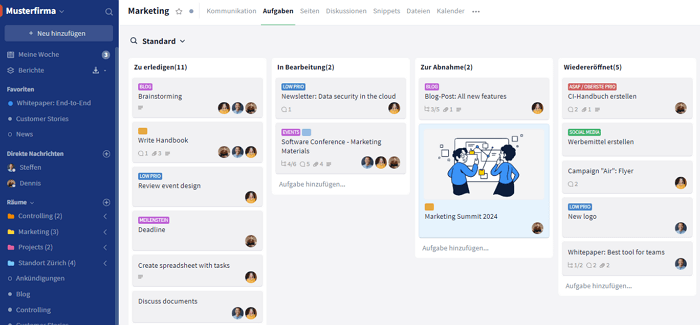
Strengths:
- All-in-one platform without functional compromises across chat, task management, and conferencing
- Intuitive user interface that helps even less technical users become productive quickly
- Multi-language phone support provided by real people, not chatbots
- True end-to-end encryption, ISO 27001 certification, and BSI C5 attestation included as standard rather than as optional add-ons
Limitation:
Stackfield requires a minimum of five licenses, making it less suitable for solo professionals or very small teams of two people.
Microsoft Teams: Office integration with high complexity
Microsoft Teams combines chat, audio and video conferencing, and file storage through SharePoint. Task management is only available through the Planner add-on, which keeps it separate from the actual conversation. Organizations that are already deeply invested in Microsoft 365 benefit from a familiar interface. Those looking for true project management capabilities or end-to-end data sovereignty will quickly encounter limitations.
Best suited for:
Organizations that already use Microsoft 365 across the company and want to leverage Teams as an extension of their existing software stack.
Strengths:
- Seamless integration with Microsoft 365
- Widely adopted across large organizations
- Familiar experience for existing Office users with minimal onboarding required
Limitations:
- No native true end-to-end encryption for group chats (E2EE is available only for one-to-one calls and meetings and must be enabled by an administrator; group chats remain unencrypted)
- Data remains subject to US jurisdiction
- Project management capabilities are limited
- Task management requires a separate add-on
- Disproportionately complex for teams without an existing Microsoft ecosystem
Slack: Channel-based messaging with strong dependence on add-ons
Slack focuses on channels, threads, and Huddles for spontaneous audio and video conversations with screen sharing. Boards and Canvas provide additional collaboration capabilities, but they function as templates that need to be built and maintained rather than as fully integrated workflows. Teams looking for a ready-to-use alternative may find Stackfield to be a more complete replacement for Slack.
Best suited for:
Teams that rely heavily on third-party integrations and operate within a technically sophisticated environment that depends on a broad app ecosystem.
Strengths:
- Mature channel and thread architecture
- Extensive integration ecosystem through third-party applications
Limitations:
- No native task management
- No dedicated file management system
- EU data residency is only available as an optional add-on for Business+ and Enterprise Grid customers; data is stored in the US by default
- No true end-to-end encryption
- Slack AI is only available as a paid add-on
Nextcloud Hub: Collaboration platform with a self-hosting focus
Nextcloud Hub combines group and direct messaging through Nextcloud Talk, video conferencing with screen sharing, file management, wiki pages, and office integration within an open-source environment. Organizations looking for a managed alternative can compare it directly with Stackfield as a Nextcloud alternative.
Best suited for:
technically experienced teams and organizations that prioritize maximum data control and flexibility through self-hosting.
Strengths:
- End-to-end encryption is available
- Data is hosted exclusively within Germany and the EU
- Broad functionality covering chat, video conferencing, file management, and office integration
Limitations:
- Setup and operation require technical expertise or a hosting partner
- No phone support is available
- The barrier to entry can be high for teams without an IT department
Factro: Project management with a chat component
Factro is a German solution focused primarily on project and task management. Its core functionality includes work breakdown structures, Gantt charts, and detailed task fields, supplemented by comments and task-based chat functionality.
Best suited for:
Project-driven teams with a traditional project management focus that only require communication within the context of tasks.
Strengths:
- German provider
- GDPR-compliant
- Structured project and task management capabilities
Limitations:
- Communication remains tightly tied to individual tasks
- No standalone team chat
- No true end-to-end encryption
- No integrated audio or video conferencing with screen sharing
Which team chat tool is right for which team?
The following overview matches typical team profiles with the most suitable tool, based on their primary needs and general requirements.
| Team profile |
Main need |
Recommended tool |
| Small teams with a simple PM focus |
Task management with integrated chat functionality, no separate group chat required |
factro |
| Agencies and project-driven teams |
Communication directly within tasks, no context switching |
Stackfield |
| Microsoft 365 organizations |
Existing Office stack, no additional licenses |
Microsoft Teams |
| Teams without a Microsoft stack |
Channel-based messaging, limited PM requirements |
Slack |
| Technically skilled teams with an IT department |
Maximum data control, self-hosting, open source/td>
| Nextcloud Hub |
| Public authorities and the public sector |
German data hosting, BSI C5, true end-to-end encryption |
Stackfield |
| Regulated industries, such as healthcare and finance |
GDPR, NIS2, encrypted communication |
Stackfield |
For public authorities, regulated industries, and teams looking to consolidate their tool stack, Stackfield is the obvious choice: BSI C5, true end-to-end encryption, and multiple functional areas in one platform resolve the conflict between broad functionality and digital sovereignty.
Microsoft Teams remains a sensible option when the entire stack runs on Microsoft 365 and data sovereignty is not a central requirement. Slack is suitable for setups where many third-party integrations shape day-to-day work and EU data hosting is not a priority.
Project management without compromise, including team chat
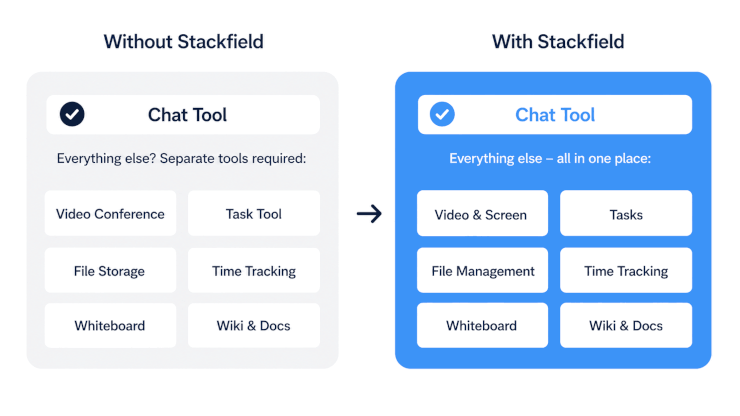
Teams looking for a team chat tool will find many options for pure communication, for Office stacks, or for technically skilled teams with self-hosting requirements. The real question is how many additional tools need to run alongside it before efficient collaboration is even possible.
Stackfield addresses exactly this point. Chat, task-based discussions, video conferencing, and file management all run in one platform, without having to open three tabs before the actual work can begin. No either-or between broad functionality and simplicity, between German data protection standards and a tool that actually works in everyday use.
Fewer tools, more clarity Chat, tasks, files, and video conferencing all run in one platform. No either-or, no tool switching, no information loss between apps.
Try it for free now
FAQ
Which team chat is truly GDPR-compliant?
GDPR compliance primarily requires providers that are headquartered in the EU, store data within the EU, and do not rely on US-based subprocessors. Among the tools compared, Stackfield meets these criteria: headquarters in Germany/EU, exclusive data hosting within Germany/EU, and no external tracking through third-party services.
What is the difference between Microsoft Teams and Slack as team chat tools?
Microsoft Teams is deeply integrated into Microsoft 365 and is designed for large organizations that already rely on the Microsoft ecosystem. Slack focuses on channel-based messaging and offers an extensive ecosystem of third-party integrations and apps. Neither platform provides true end-to-end encryption by default, and both companies are headquartered outside the EU.
Do I need a separate tool for video conferencing?
Not necessarily. Stackfield includes native audio and video conferencing with screen sharing, eliminating the need for a separate solution. Many providers do not offer their own conferencing capabilities, which increases the number of tools in the stack and leads to even more context switching.
Which team chat tool is suitable for public authorities?
Suitable solutions should provide a BSI C5 attestation, ISO 27001 certification, data hosting in Germany, and no US-based subprocessors. Among the tools compared, Stackfield fully meets these requirements and is the only platform that combines true end-to-end encryption with a German headquarters.
What should a team chat tool be able to do at a minimum?
In addition to group and direct messaging, task management, file storage, and video conferencing should be available within the same platform. Organizations that spread these functions across separate tools pay the price of context switching twice: through lost productivity, additional licensing costs, and information that gets lost between systems.