You’re managing tasks in MeisterTask, your team is growing, and your projects are becoming more complex. Suddenly, you need more than just a Kanban board – you need a chat tool, a video solution, and file storage. Tool sprawl is real, and it’s costing your business time, money, and energy.
This comparison helps IT decision-makers and project leaders in the DACH region find the right MeisterTask alternative. Honest, with a focus on features, data privacy, and European options. At Stackfield, we know from experience what matters when choosing a project management tool. That’s why we place a strong emphasis on European alternatives that treat data sovereignty not as an add-on, but as a core principle.
All your team needs – in one tool:
Switch to a platform that combines project management, chat, and video without compromising on data privacy.
Find your MeisterTask alternative
The essentials at a glance
- Top reason to switch: MeisterTask can reach its limits when it comes to Gantt charts, reporting, and cross-project dependencies – growing teams need more than just a Kanban board.
- Data privacy matters: GDPR compliance, server location, and encryption standards are key selection criteria for companies and organizations in the DACH region.
- All-in-one beats tool sprawl: A single platform for tasks, chat, video, and files reduces costs and minimizes friction in day-to-day work.
- European alternatives on the rise: The CLOUD Act and growing awareness of digital sovereignty are driving demand for EU-hosted solutions with true data sovereignty.
- Stackfield as a complete solution: True end-to-end encryption, ISO 27001, BSI C5, and German-language support combined in a single platform.
When MeisterTask reaches its limits
MeisterTask is a solid Kanban tool that works well for simple task management. Small teams with straightforward projects can often go surprisingly far with it. However, as teams grow, projects become more complex, and multiple departments need to collaborate, its limitations start to show. The search for a MeisterTask alternative rarely starts for a single reason. More often, it’s a combination of missing features that gradually builds up over time.
The most common reasons for switching at a glance:
- No true Gantt charts: MeisterTask only offers a basic timeline without full dependencies or milestones. This isn’t sufficient for complex project planning.
- No cross-project views: Managing multiple projects in parallel quickly becomes confusing, as dependencies between projects cannot be mapped. Dedicated multi-project management tools can solve this.
- Limited custom fields: Only text, number, and dropdown fields are available. This lacks the flexibility needed for customized workflows.
- Free plan with limitations: As soon as your needs grow, you’ll need to upgrade to a paid plan. The true cost of "free" project management software is often underestimated.
- No fully integrated chat or video calls: Communication requires third-party tools like Slack or Zoom, increasing tool sprawl.
- Limited reporting and automation: Reports and automated workflows are only available in higher-tier plans or not at all.
- Limited collaboration on notes and to-do lists: Collaborative work on documents or shared lists is barely supported.
Switching tools is therefore more than just replacing software. It’s an opportunity to reduce tool sprawl and bring tasks, communication, and files together in one place. At the same time, data privacy is becoming an increasingly important factor when evaluating new project management tools. GDPR compliance, server location, and encryption standards are no longer secondary considerations, they are core requirements in procurement decisions.
Key criteria when choosing an alternative
Before comparing tools, take a step back: what does your team actually need? Which features do you use daily, and which ones are missing? And what requirements will emerge over the next 12 months? The following checklist will help you approach the decision in a structured way and avoid overlooking critical criteria:
- Features and project views: A Kanban board alone is often not enough. Check whether the tool offers Gantt charts, tables, timelines, and cross-project views to properly manage complex projects and dependencies.
- Team size and scalability: Does the solution work just as well for 5 users as it does for 500? Make sure the licensing model can scale with your company without sacrificing features or performance.
- All-in-one vs. best-of-breed: Does your team need separate tools for chat, video, and file storage alongside the PM tool? Or can collaboration, communication, and project management be unified in a single platform?
- Data privacy and security: Server location, encryption standards (end-to-end vs. at rest), and certifications like ISO 27001 or BSI C5 are key decision factors, especially in the DACH region.
- Pricing and licensing model: Costs per user, minimum licenses, and hidden fees for features or integrations can add up quickly. Compare total costs, not just the entry price.
- Support and onboarding: German-language customer support, dedicated contacts, and high-quality training materials can make the difference between a smooth rollout and weeks of frustration.
The "all-in-one" criterion in particular is often underestimated. Replacing three tools with a single platform doesn’t just save on licensing costs, it also reduces onboarding time and workflow friction. Instead of switching between a project management tool, a chat app, and a video conferencing solution, your entire team works in one place. Especially for organizations with high security and data protection requirements, it’s worth taking a closer look at how a platform encrypts data and where it is hosted.
Which MeisterTask alternative fits your team? 7 tools compared
Seven project management tools, three of them from Germany, all with different strengths. So you don’t have to research each tool individually, you’ll first find a compact comparison table for quick orientation. Afterwards, we present each MeisterTask alternative in detail, including strengths, limitations, and an honest assessment of which team each tool is best suited for.
| Tool |
Project views |
Integrated chat |
E2E |
EU subcontractors only |
| Stackfield |
Kanban, Gantt, etc. |
✔
✔
| ✔
| | |
| ClickUp |
Kanban, Gantt, etc. |
✔
✖
| ✖
| | |
| Asana |
Kanban, Gantt |
✖
✖
| ✖
| | |
| Monday.com |
Kanban, Gantt |
✖
✖
| ✖
| | |
| Trello |
Kanban |
✖
✖
| ✖
| | |
| awork |
Kanban, Gantt |
✖
✖
| ✖
| | |
| factro |
Kanban, Gantt |
✖
✖
| ✖
| | |
Stackfield: German all-in-one platform with end-to-end encryption
Stackfield is a German collaboration platform based in Munich that combines project management, team communication, video conferencing, and document management in a single solution. It is specifically designed for teams and organizations with high requirements for data privacy, compliance, and efficient collaboration.
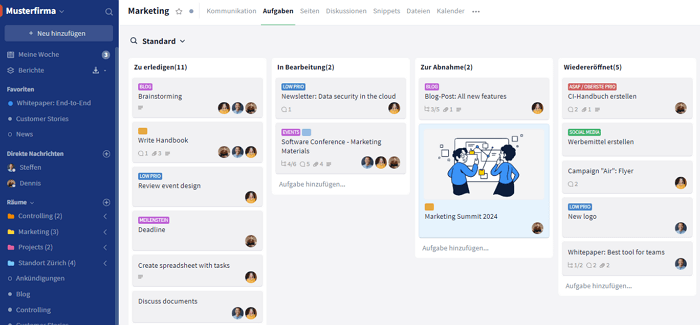
What sets Stackfield apart from other project management tools is its consistent combination of functionality and security. All data and communication are protected by true end-to-end encryption. This means that not even Stackfield itself can access any content. In addition, certifications such as ISO 27001 and the BSI C5 attestation play a crucial role, especially in the public sector and regulated industries.
From a functional perspective, Stackfield as an all-in-one solution covers everything teams need in their daily work: Kanban boards and Gantt charts for project planning, an integrated chat for quick coordination, video conferencing without third-party tools, shared office documents for collaborative work, and whiteboards for brainstorming sessions. Hosting and data processing take place exclusively in Germany. And if you have any questions, you can reach a dedicated multilingual customer success team.
Strengths:
Limitations to be aware of:
- Minimum of 5 licenses required
- No permanent free plan, rather a 14-day trial
- The feature set may feel extensive for beginners at first
Who is Stackfield for?
Teams of all sizes with requirements for data privacy, compliance, or tool consolidation, as well as organizations in the public sector, regulated industries such as healthcare or finance, and companies looking to reduce tool sprawl.
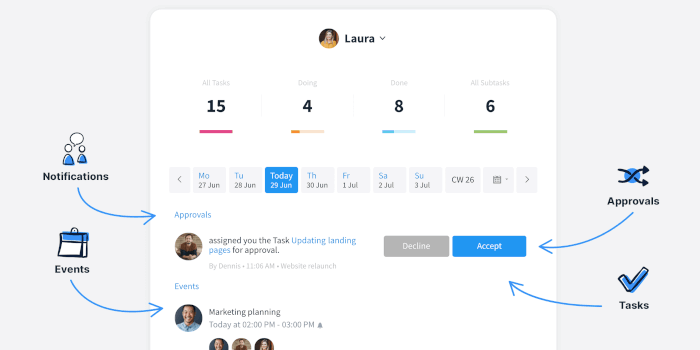
Pricing starts with the Starter plan at €9 per user per month, Business from €14, Premium from €18, and Enterprise from €28 per user per month when billed annually.
Try Stackfield for free for 14 days
ClickUp: Extensive features for tech-savvy teams
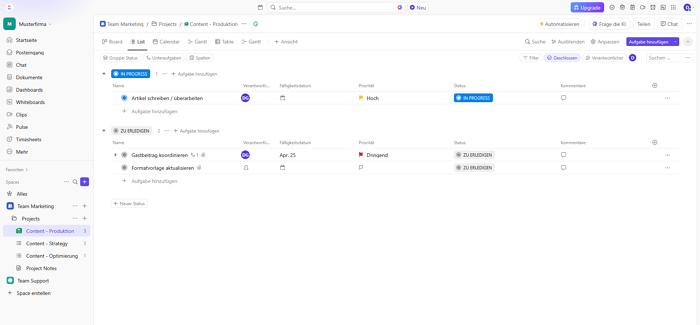
lickUp is a US-based project management platform that has been known for its extensive feature set since its founding in 2017. Few other tools offer such a wide range of configuration options. This is exactly what makes ClickUp an attractive MeisterTask alternative for teams looking for maximum flexibility. If you are instead looking for a European solution with a strong focus on data privacy, Stackfield is a compelling alternative to ClickUp.
 Strengths:
- More than 15 project views including Kanban, Gantt, table, mind map, and whiteboard
- Automations and task dependencies
- Free plan available for getting started
- Rating: 4.1 / 5 on OMR Reviews
Limitations:
- Steep learning curve due to the extensive feature set
- US-Hosting, keine Ende-zu-Ende-Verschlüsselung
- Kein integrierter Videochat für die Teamkommunikation
Who is it for?
Development teams and tech-savvy users who need a wide range of features and do not have strict data privacy requirements.
Pricing:
In addition to a free base version, several plans are available. The "Unlimited plan" starts at $7 per user / month, while the Business plan starts at $12 per user /month. Pricing for the Enterprise plan is available on request.
Asana: Established project management for structured teams
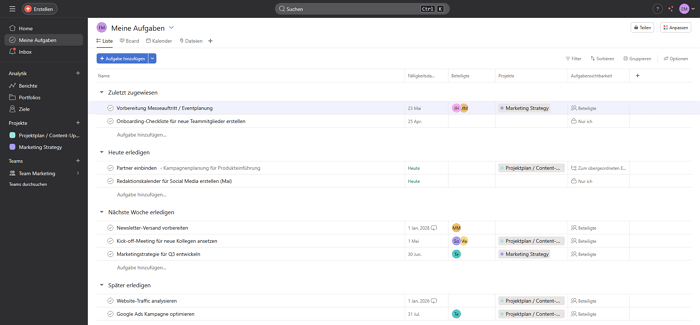
Asana was founded in 2008, including by a Facebook co-founder, and is one of the more established project management tools worldwide. Known for its clear structure, reporting capabilities, and portfolio management, Asana is especially popular among mid-sized, process-driven teams.
 Strengths:
- Multiple project views including Kanban, list, timeline, and calendar
- Reporting and portfolio management for project-level insights
- Workflow automations for recurring tasks
- Rating: 4.3 / 5 on OMR Reviews
Limitations:
- No integrated chat or video calls
- US data processing, no true end-to-end encryption
Who is it for?
Mid-sized teams focused on reporting and structured workflows that do not require strict European data privacy standards. Teams looking for an all-in-one solution with a strong focus on data protection may consider Stackfield as an alternative to Asana.
Pricing:
Free base version for a limited number of users, Starter plan from €11, Advanced from €24.99 per user per month when billed annually. Enterprise pricing is available upon request. Additional costs may apply through optional add-ons.
Monday.com: Visual work OS for marketing and creative teams
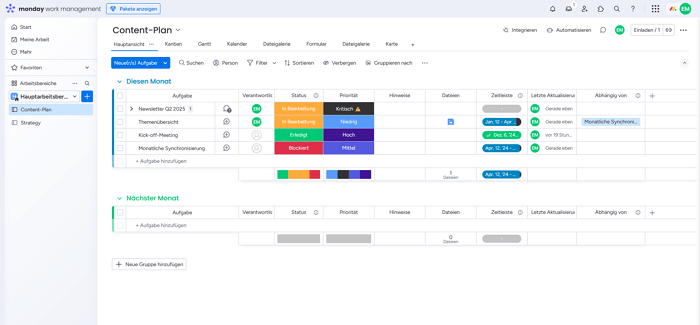
Monday.com is an Israeli company positioning itself as a "Work OS". The flexible platform is especially popular with marketing and creative teams because it focuses on visual workflows and customizable dashboards. If you are looking for a solution that combines visual workflows with chat and video in one platform, Stackfield is a strong alternative to Monday.com.
 Strengths:
- Visually customizable dashboards and workflows
- Automations for recurring workflows
- Extensive integration ecosystem
- Rating: 4.4 / 5 on OMR Reviews
Limitations:
- Pricing scales with number of users and selected features
- Hosting partially outside the EU
- No permanent free plan available for larger teams
Who is it for?
Marketing and creative teams with a focus on visual workflows and automation.
Pricing:
Free base version for a limited number of users, paid plans starting with Basic from approx. €9, Standard from €12, and Pro from €19 per user per month. Enterprise pricing is available upon request. A minimum of three users generally applies.
Trello: Kanban classic for small teams
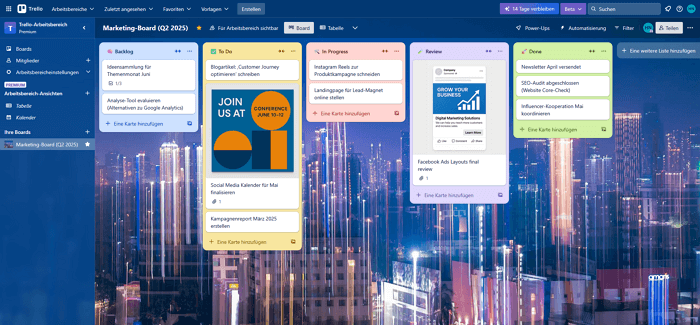
Since 2017, Trello has been part of Atlassian and is considered the benchmark for simple Kanban boards. Millions of teams worldwide use Trello for straightforward task management. If you are looking for a lean and intuitive solution without a steep learning curve, Trello is a proven option. As teams grow and require more structure, Stackfield is a strong alternative to Trello.
 Strengths:
- Easy onboarding and intuitive interface
- Power-Up ecosystem for extensions and integrations
- Free plan with unlimited boards
- Rating: 4.3 / 5 on OMR Reviews
Limitations:
- Only Kanban available natively, no native Gantt or timeline, only via Power-Ups
- KNo integrated chat or video calls
- US hosting via Atlassian, no true end-to-end encryption
Who is it for?
Small teams and individual users with simple task management needs.
Pricing:
Free for up to 10 users per workspace, Standard plan from $5 per user per month, Premium from $10 per user per month, and Enterprise from $17.50 per user per month when billed annually.
awork: German alternative with a focus on agencies
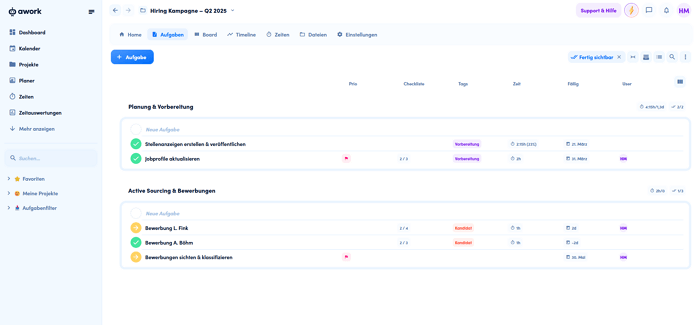
awork is a German project management tool based in Hamburg that is specifically designed for agencies and creative teams. It is particularly known for its modern interface and integrated time tracking, combining project planning and resource management in one workspace.
 Strengths:
- German hosting, GDPR-compliant
- Modern interface with quick onboarding
- Integrated time tracking, especially valuable for agencies and service providers
- Kanban, Gantt charts, and list view
- Rating: 4.5 / 5 on OMR Reviews
Limitations:
- No integrated chat or video calls
- No BSI C5 attestation, no true end-to-end encryption
Who is it for?
Agencies and creative teams in the DACH region that want to combine time tracking and project planning in one tool.
Pricing:
Paid plans starting with Basic from €5 per user per month, Standard from €11 per user per month, and Professional from €19 per user per month when billed annually. Enterprise pricing is available upon request.
factro: German project management tool for SMEs
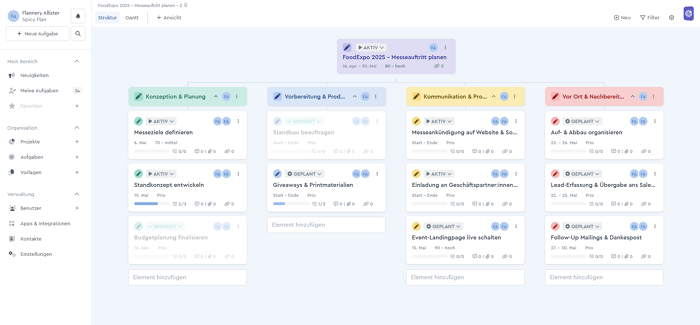
factro is a German project management tool based in Bochum that is designed for small and medium-sized businesses. It is particularly known for its work breakdown structure, which allows complex projects to be mapped hierarchically. If you are looking for more advanced functionality, Stackfield is a strong alternative to factro.
 Strengths:
- German hosting in Frankfurt and Nuremberg, GDPR-compliant
- Four project views: Kanban, Gantt, table, and work breakdown structure
- Cross-project Kanban board
- Free basic plan available
- Rating: 4.6 / 5 on OMR Reviews
Limitations:
- No integrated chat or video calls
- Limited integration ecosystem
Who is it for?
German SMEs that value traditional project management and German hosting. Additional guidance can be found in our article on project management for SMEs.
Pricing:
Free Basic plan for up to 3 users, Business from €19.99 per user per month for 3 or more users, and Professional from €29.99 per user per month for 3 or more users when billed annually. The Government plan is designed for cities, municipalities, and ministries and is available upon request through consultation.
European alternatives like MeisterTask – why this matters now
The demand for European tools with strong data protection standards is a measurable trend. Legal developments such as the CLOUD Act, increasing pressure on IT budgets, and growing awareness of digital sovereignty are driving companies to critically reassess their tool landscape.
What used to be primarily a concern for data protection officers is now equally relevant for executives, IT leaders, and project managers. The question is no longer "Do we need a European solution?" but "Which European solution is the right fit for us?
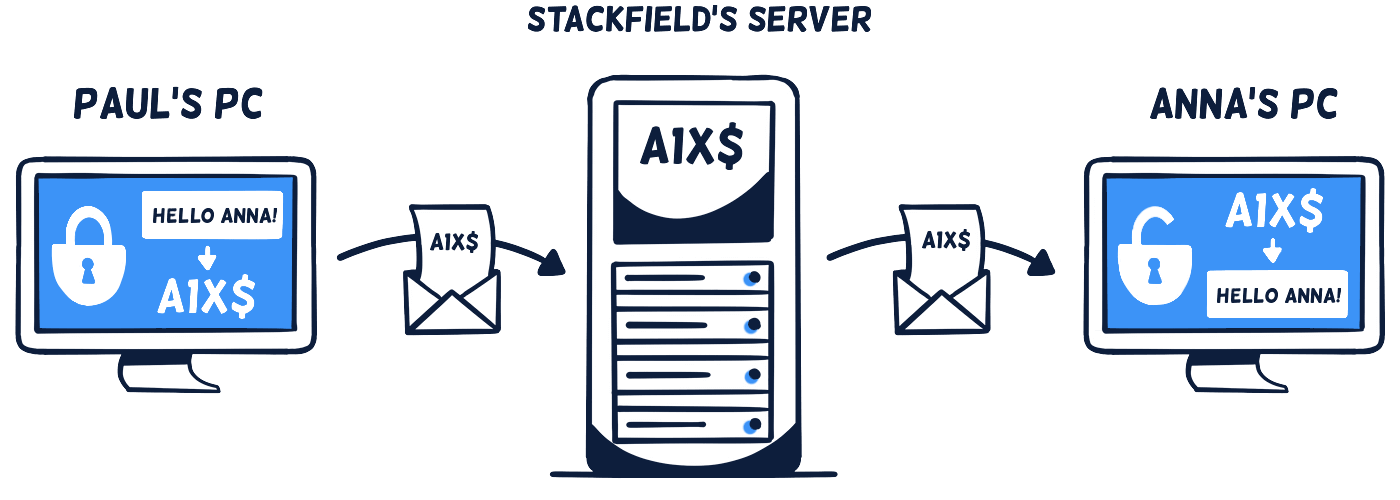
The US CLOUD Act allows US authorities, under certain conditions, to access data stored by US companies regardless of whether the servers are located in the United States or in Frankfurt. For teams, this means that when using a US-based tool, there is no absolute certainty that project data, customer data, or internal communication is protected from external access.
However, not all "European" solutions are the same. There are three levels of data sovereignty that make the difference:
| Level |
What it means |
Example |
| EU hosting |
Data is stored on servers in the EU,
but the provider is subject to, for example, U.S. law (CLOUD Act) |
Many US tools with
EU data centers |
| German jurisdiction |
Company headquarters and legal structure are subject to
German or EU law |
Stackfield, MeisterTask,
awork, factro |
| True end-to-end encryption |
Even the provider cannot access the content |
Stackfield |
Of the eight tools in this comparison, Stackfield, MeisterTask, awork, and factro are German companies subject exclusively to German law. However, when it comes to hosting, there are important differences: Stackfield uses only servers from providers based in Germany, while MeisterTask, awork, and factro rely on infrastructure from US providers.
The decision to switch tools should therefore not be based solely on server location, but also on functionality and the question whether a single tool can consolidate tasks, communication, and files in one place. If you want to explore topics like digital sovereignty or the impact of the Data Act and AI Act on tool selection in more detail, these can provide valuable guidance for your decision.
How to choose the right MeisterTask alternative – what really matters
The longest feature list does not automatically win. What matters is which project management tool fits your team’s day-to-day work. Instead of ticking off features on a website, start with your actual needs: how does your team work today, where does friction occur, and what requirements will emerge in the coming months? Answering these questions first in a project management software comparison will lead to a decision that lasts.
One factor is particularly underestimated: if your team needs Slack for communication, Zoom for video calls, and Dropbox for file storage in addition to a project management tool, it is not just licensing costs that increase. Onboarding time, workflow fragmentation, and coordination effort also grow with every additional tool. An all-in-one solution can eliminate this complexity by bringing tasks, chat, video, and files together in one place. Our project management software comparison also provides a comprehensive overview of current options.
| Your use case |
Recommended tool |
Why? |
Multiple project views, whiteboards,
integrated chat and video, office documents,
time tracking, suitable for any team |
Stackfield |
True end-to-end encryption,
all-in-one, German hosting,
personal support |
| Extensive features, technical team |
ClickUp |
Broad feature set,
high configurability |
| Structured workflows, mid-size team |
Asana |
Strong reporting
and portfolio management |
| Marketing and creative teams |
Monday.com |
Visual dashboards,
flexible automations |
| Simple Kanban, small team |
Trello |
Lowest entry barrier,
generous free plan |
| Agency with time tracking |
awork |
Integrated time tracking,
German hosting |
| German SME, traditional project planning |
factro |
Work breakdown structure,
free plan, made in Germany |
Beyond features and pricing, it is worth considering three factors that make a real difference in practice: how accessible is customer support when issues arise during rollout? Does the provider offer active migration support to ensure a smooth transition? And can the software scale as your company grows over time? By factoring these questions into your decision, you are not just choosing a tool, but a solution that will support long-term collaboration within your team.
Switching from MeisterTask – how to migrate successfully
Switching tools often sounds more complicated than it actually is. The most important principle: avoid a big-bang migration where the old tool is switched off and the new one is switched on on the same day. Instead, take a phased approach with a clear plan and realistic expectations. This way, your team can maintain productivity while the transition is underway.
MeisterTask offers a CSV export for tasks, allowing project data to be downloaded in a structured format. Task names, descriptions, statuses, and assignments can be transferred to most project management tools. However, comments, attachments, and automations are often excluded from the export and may need to be migrated manually if required. It is worth reviewing in advance which data actually needs to be transferred and which projects can be archived.
This checklist will help you prepare the migration properly:
- Inventory: Which projects and boards are still active, and which can be archived? Migrating less means less effort.
- Roles and permissions: Who needs access to what in the new tool? Define access rights and team structures in advance to ensure smooth onboarding.
- Integrations: Which third-party tools such as Slack, calendars, or email need to be connected? List all active integrations.
- Test phase: Test the new tool with a pilot project and a small team. Do not switch the entire organization at once.
- Training: Clarify onboarding resources and define points of contact so team members know where to turn with questions.
- Feedback loop: Evaluate and adjust after two to four weeks. Which workflows are working, and where are there still issues?
A key difference when choosing a new tool is whether you have to manage the migration on your own or receive personal support. With Stackfield, a multilangual customer success team supports the entire transition, from data migration and implementation of Stackfield within your organization to onboarding your team. No ticket system, no chatbot, but real contacts who understand the process.
If you want to transfer existing tasks from MeisterTask or other tools, the guide on switching to Stackfield provides a helpful step-by-step overview.
Conclusion: Less tools, more focus – with Stackfield
There is no single best MeisterTask alternative. There is only the right solution for your team, your projects, and your requirements. ClickUp stands out for its feature set, Trello for its simplicity, and awork for its time tracking. But if you take an honest look at your daily work, you will realize that the real problem is rarely a single missing feature. It is tool sprawl that slows teams down. If you want to do more than just replace a project management tool and instead bring tasks, communication, and files together in one place, you need an all-in-one solution..
For teams that see data privacy, compliance, and personal support not as optional extras but as essential requirements, Stackfield is the logical choice. Project management, chat, video conferencing, and document management in one platform, truly end-to-end encrypted, hosted in Germany, with a customer success team that is personally available to answer questions.
Ready for fewer tools and more clarity? Stackfield combines project management, team communication, and document management in one platform – with true end-to-end encrypted, hosted in Germany, and with personal support.
Try it for free now
FAQ
Which MeisterTask alternative is GDPR-compliant and hosts data in Germany?
MeisterTask hosts data in Germany but uses Google Cloud as its infrastructure. Stackfield, awork, and factro are German providers with hosting in Germany and full GDPR compliance. Stackfield goes one step further: with true end-to-end encryption, not even Stackfield itself can access user data. In addition, Stackfield is ISO 27001 certified and BSI C5 attested.
What does MeisterTask lack that alternatives offer?
MeisterTask only provides limited Gantt or timeline functionality without complex dependencies and does not include an integrated chat or video call. Custom fields are limited to three types. Alternatives like Stackfield or ClickUp offer significantly more project views, communication features, and automation options.
Can I migrate my projects from MeisterTask?
Yes. MeisterTask offers a CSV export for tasks. The exported data can be imported into most alternative tools. With Stackfield, the customer success team supports the migration personally, from data transfer to onboarding the entire team.
Which alternative is suitable for the public sector?
Stackfield is particularly well suited for the public sector – thanks to ISO 27001 certification, BSI C5 attestation, true end-to-end encryption, and German hosting. Stackfield is already used by press offices and research institutions and meets the strict requirements of public procurement.
Do I still need separate chat and video tools alongside a MeisterTask alternative?
That depends on the tool you choose. Most alternatives, including ClickUp, Asana, Trello, awork, and factro, do not offer integrated chat or video calls. Stackfield is one of the few platforms that combines project management, chat, video conferencing, and document management in a single solution.