End of the month, and the invoice needs to go out. Then you realize: some of the hours are missing. Someone forgot to transfer their time entries. Someone else logged them under the wrong project. And the export file from the time tracking tool doesn't match the format accounting needs.
This is not an isolated case. If you manage projects and track time in two separate tools, you pay a hidden price every month: lost hours, duplicate data entry, and billing errors that only become apparent when it's too late. The solution is a tool that natively combines both. This comparison shows you the five best project management tools with time tracking for 2026.
The essentials at a glance
- Integrated time tracking saves real money: When time is logged directly within the task, no hours are lost during transfers and every billable hour makes it onto the invoice.
- Billing status is the key feature: A billable / non-billable designation combined with the ability to lock entries that have already been billed shows at a glance which hours are still outstanding. Not every tool offers this.
- Data protection is not a bonus feature: If you work with customer data, you need hosting in Germany or the EU and should check which subcontractors are involved.
- Stackfield combines everything without compromise: As the only tool in this comparison, Stackfield combines native time tracking, comprehensive project management, and true end-to-end encryption on German servers.
Project management and time tracking in one tool
Track hours directly within tasks, mark them as billed, and export them. No additional tool, no switching between systems.
Bill every hour accurately now
Time tracking in project management: Why the right tool matters
Integrated time tracking means that the timer runs directly within the task, not in a separate app. Every hour logged is immediately assigned to the correct project. No transferring, no reconciling, no chasing people for missing entries.
When time tracking and project management run in two different systems, disruptions in the workflow are inevitable. Hours are lost because someone forgets to log them. Project hours cannot be assigned correctly because the task structure in the project management tool differs from the one in the time tracking tool. Exporting the data for accounting takes more time than tracking it in the first place.
Three things determine whether a tool is truly suitable for billing:
- The billing status, meaning whether logged hours can be marked as billed or outstanding.
- The export format, as PDF, CSV, and Excel offer different levels of compatibility with accounting systems.
- The completeness of the project management features: time tracking alone is not enough.
Teams that bill by the hour also need Gantt charts, Kanban, and portfolio overviews in the same tool.
The 5 best project management tools with time tracking compared
The following overview shows at a glance how the five tools perform against the key criteria.
|
Stackfield |
ClickUp |
MeisterTask |
Factro |
OpenProject |
| Time tracking |
✔ native |
✔ native |
✔ native |
⚠ from Professional |
✔ native |
| Gantt / Kanban |
✔ |
✔ |
✔ |
⚠ Gantt from Business |
✔ |
| Portfolio management |
✔ |
✔ |
✖ |
✔ |
✔ |
| Workflows |
✔ |
✔ |
✔ |
✖ |
✔ |
| Data hosting exclusively in DE / EU |
✔ |
✖ |
✖ |
✔ |
✖ |
| Subcontractors exclusively in DE / EU |
✔ |
✖ |
✖ |
✖ |
✔ |
| True E2E encryption |
✔ |
✖ |
✖ |
✖ |
✖ |
| Support in German |
✔ |
✖ |
✔ |
✔ |
✔ |
Legende:
✔ = available
✖ = not available
⚠ = limited or only available via third parties
Stackfield: Project management without compromise
Stackfield is a German project management and collaboration platform with true end-to-end encryption at its core. On the market for more than 14 years, the platform is trusted by more than 10,000 companies for their day-to-day project and teamwork. Integrated time tracking not only allows team members to record their working hours, but also makes collaboration with external partners easier.
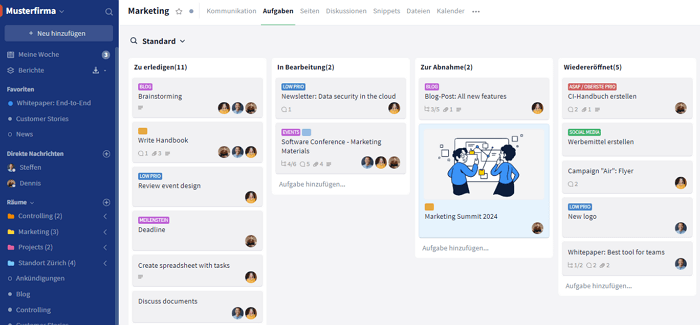
How does time tracking work in Stackfield? Before you can use time tracking, it must be enabled in the room settings. Once activated, you will find the stopwatch icon in every task card. There are two ways to track time:
- Start and stop the timer: Start the timer directly while working on a task and stop it when you are done. You can add a note to each time entry.
- Manual entry: Time can also be entered retrospectively and edited or deleted at any time.
Additional time tracking features include:
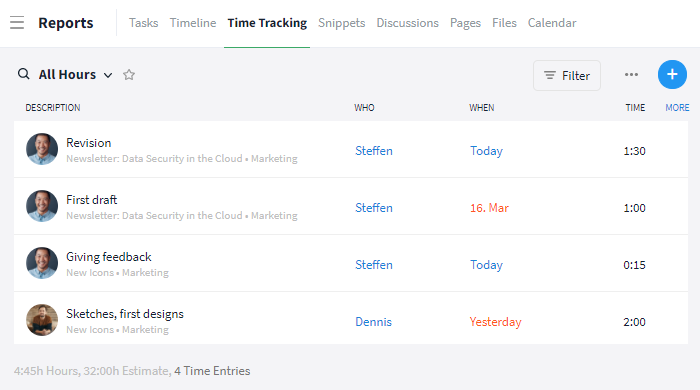
- Billable status and locking function: Time entries can be marked as billable or non-billable. Once they have been billed, you can lock the entries so they cannot be invoiced again or accidentally modified. Reports can be filtered by lock status.
- Export: Export all time entries as PDF, CSV, or Excel directly from the Reports module.
- Estimated vs. actual time: Enter an estimate and compare it with the actual time spent. Once the estimate is exceeded, the progress bar turns red.
- Cross-room reports: Use "Reports" in the sidebar to analyze time entries across all rooms, filter them by task or team member, and export the report.
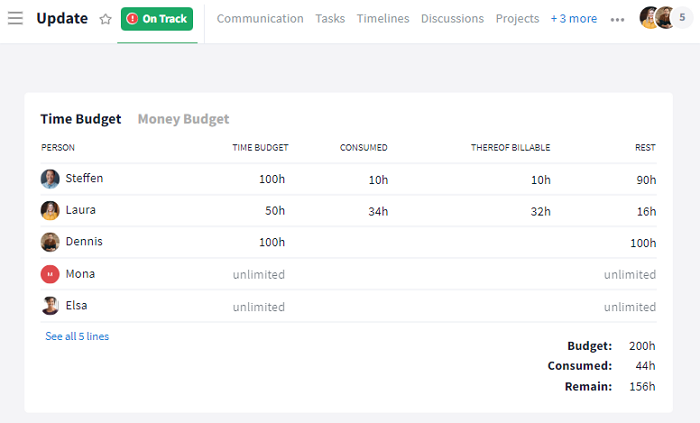
Project rooms offer additional features:
- Time budget per project: The resources bar in the project details shows at a glance how much of the available time budget has already been used. Blue: within budget. Yellow: 90% reached. Red: budget exceeded.
- Time allowance per team member: Set an individual time allowance for each member. The overview shows how much time each person has used and how much remains.
Strengths:
- Native time tracking (manual + stopwatch) directly within tasks, included in all plans
- Billable / non-billable status plus locking function for clean billing processes
- PDF, CSV, and Excel exports from the Reports module
- Estimated vs. actual time with a visual progress bar
- Time budget per project with traffic-light visualization
- Time allowance per team member with usage overview
- Cross-room reports with filtering and export functionality
- Comprehensive PM features: Gantt, Kanban, PERT, project portfolios, budget planning
- True end-to-end encryption, ISO 27001, BSI C5, German servers
Limitations:
- No native invoicing module: Hours are exported and processed further in an external accounting tool
Best suited for: Agencies, service providers, SMEs, and public-sector teams that bill by the hour, need to manage capacity across projects, and want to protect customer data.
Pricing: Free 14-day trial; the trial ends automatically. Starter from €9 / user / month, Business from €14, Premium from €18, Enterprise from €28 (all billed annually, minimum of five users). View all plans on stackfield.com.
ClickUp: Broad range of features without German server hosting
ClickUp is a US-based project management platform that has offered a broad range of features since its launch in 2017.
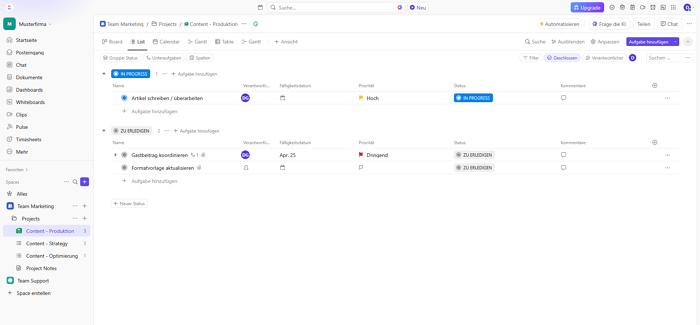
How does time tracking work in ClickUp? The timer can be started directly within each task. Time entries can be marked as billable: up to 100 times on the Free plan and without limits from the Business plan onwards. Time reports can be filtered by user or project and exported.
Strengths:
- Broad range of PM features: Gantt, Kanban, Goals, Dashboards, and more than 15 project views
- Automations and task dependencies
- Free entry-level plan available
Limitations:
- US server location, no hosting in Germany
- Steep learning curve due to the extensive range of features
- No multi-language support
Best suited for: Teams looking for a high degree of customization that do not require hosting in Germany.
Pricing: Free, Unlimited from USD 7 / user / month, Business from USD 12 / user / month (billed annually).
MeisterTask: The intuitive Kanban tool with time tracking
MeisterTask is a European provider focused on Kanban-based task management with native time tracking. Its quick and easy setup is one of the main reasons smaller teams choose MeisterTask.
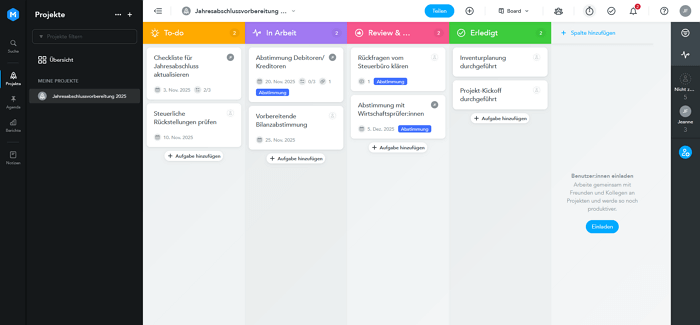
How does time tracking work in MeisterTask? The timer can be started for each task. Logged time can be analyzed in reports and marked as billable.
Strengths:
- Native time tracking directly within tasks
- Intuitive Kanban interface
- German-language support available
Limitations:
- No native Gantt chart; Timeline only available from the Business plan
- Google as a subcontractor: Data leaves the EU, meaning no true data sovereignty
- No native group chat or video conferencing
- No portfolio management
Best suited for: Small teams looking for straightforward Kanban-based task management with time tracking and without strict compliance requirements.
Pricing: Pro from €13.50 / user / month (billed annually).
Factro: The structured all-rounder from Germany
Factro is a German project management tool based in Bochum, developed and hosted in Germany. The tool focuses on traditional project structure planning, with Kanban, Gantt, and work breakdown structure as native views.
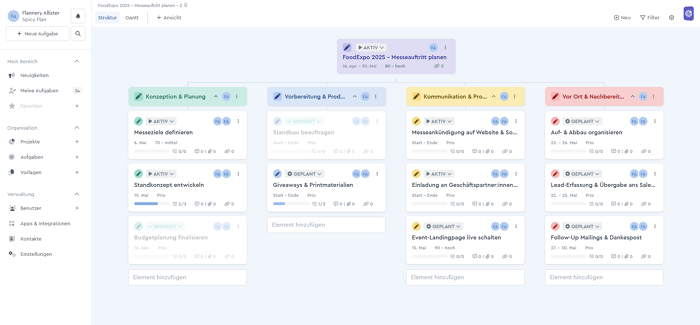
How does time tracking work in Factro? Effort tracking per task is only available from the Professional plan onwards. Time entries are entered manually and analyzed in project reports. According to available sources, there is no live timer.
Strengths:
- Development and support in Germany, with German-language support by phone and email
- Work breakdown structure as a native view, complemented by Kanban
- Free plan (Basic, up to three users) for getting started
Limitations:
- Time tracking only available from the Professional plan onwards (not included in Basic or Business)
- Gantt chart only available from the Business plan onwards
- Digital Realty as a subcontractor: no complete EU-only data hosting
- No true E2E encryption, no BSI C5
Best suited for: Mid-sized teams in Germany looking for structured project management made in Germany and that only require time tracking on a higher-tier plan.
Pricing: Basic free (up to three users); Business from €19.99 / user / month; Professional from €29.99 / user / month.
OpenProject: The transparent open-source all-rounder
OpenProject is a German open-source project management tool with a comprehensive feature set, including native time tracking and EU hosting. For teams that want control over their infrastructure, OpenProject also offers a self-hosting option.
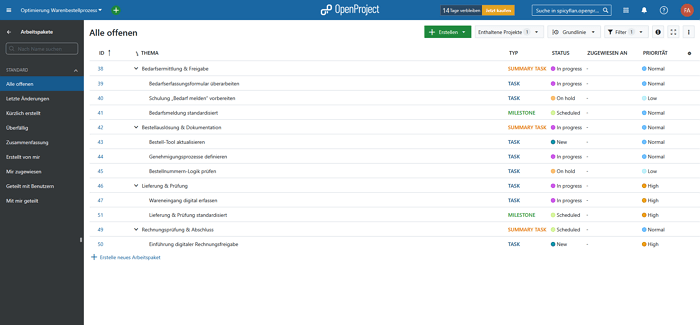
How does time tracking work in OpenProject? Time is logged for individual work packages. The time tracking module provides reports and export options. Project-level budget monitoring is also available.
Strengths:
- Native time tracking included in all plans
- Comprehensive PM features: Gantt, Kanban, portfolio management
- EU hosting, no documented US subcontractors
Limitations:
- No integrated group chat or video conferencing
- No true E2E encryption
- Self-hosting requires more setup and maintenance than SaaS solutions
Best suited for: Teams looking for a comprehensive PM tool with EU hosting that have the in-house IT resources to handle the additional setup required for self-hosting and may want to operate the software on their own infrastructure. Particularly relevant for public-sector organizations and companies with high compliance requirements.
Pricing: Community Edition free (self-hosted); Basic from €5.95 / user / month (on-premises, billed annually, minimum 25 users); cloud version available.
Track hours, bill them, done. Stackfield combines project management and time tracking in one platform with true end-to-end encryption and German servers. Try it free for 14 days.
Bill every hour accurately
What to look for when choosing a tool
Four criteria determine whether a project management tool with time tracking really works for day-to-day billing.
Criterion 1: Billing status management
Does the tool let you mark entries as billable / non-billable and lock entries that have already been billed? Without these features, you cannot reliably tell which hours have already been invoiced and which are still outstanding. This can lead to duplicate billing or forgotten line items.
Criterion 2: Export workflow
Which formats can you use to export tracked hours? PDF, CSV, and Excel offer different levels of compatibility with accounting systems such as DATEV or sevDesk. Before choosing a tool, check whether its exports work directly with your accounting system.
Criterion 3: Complete project management functionality
Time tracking alone is not enough. If the tool does not offer a Gantt chart, Kanban board, or portfolio overview, you will need a second tool to manage your projects. That simply shifts the problem of switching between systems rather than solving it.
Criterion 4: Data protection and server location
Especially for agencies working with sensitive customer data, being "GDPR-compliant" alone is not enough. What matters is where data is actually processed, including by subcontractors. MeisterTask uses Google as a subcontractor, while Factro uses Digital Realty. In both cases, this means data leaves the EU. ClickUp stores data on US servers. Organizations that want to minimize this risk need EU hosting with European subcontractors or true end-to-end encryption.
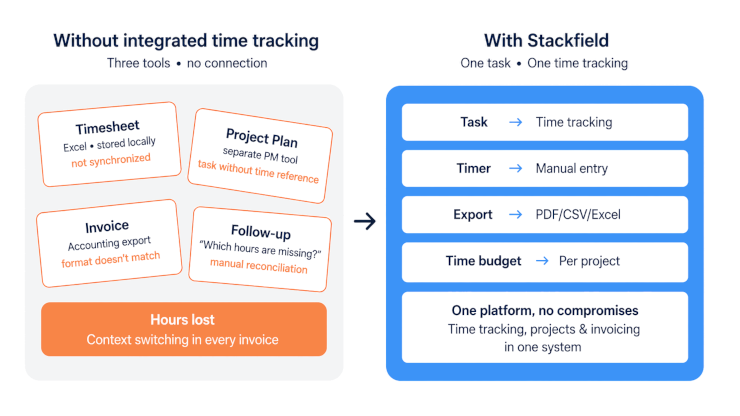
Benefits of integrated time tracking in a project management tool
Why is it worth switching from two separate tools to an integrated solution? These four benefits make a real difference in day-to-day work.
- No switching between systems: Time is tracked directly within the task. No transferring data, no reconciling information between two systems.
- Transparency for clients: The PM tool can generate clear records of work performed, showing which tasks took how much time.
- Fewer billing errors: The billing status is visible at all times. Hours do not get lost because they are recorded directly in the right context.
- Tool consolidation: One tool replaces three. Project management, time tracking, and export spreadsheets come together in one place. This saves licensing costs and reduces complexity.
Tip for your tool test: Don't just look at the features during your trial. Instead, run through a real sample billing process: Track a few hours across different tasks, mark them as billed, export the report, and check whether the format works with your accounting system. This test tells you more than any feature list.
Project management with time tracking: Stackfield as a secure choice for agencies
If you don't want to treat time tracking and data protection as a trade-off, Stackfield offers a solution that combines both without compromise. Stackfield provides comprehensive project management with Gantt charts, Kanban boards, project portfolios, and budget planning. Native time tracking adds a stopwatch, estimates, traffic-light visualization, individual time allowances for team members, and cross-room reports.
True end-to-end encryption, along with ISO 27001 certification, BSI C5, and data hosting exclusively in Germany, makes Stackfield a secure project management tool.
Agency KW NEUN shows what this looks like in practice: Project time tracking and billing take place in one system, every feedback loop is documented, and every hour worked can be traced. That's project management with time tracking without switching between systems.
Try it now: Project management with time tracking in one platform More than 10,000 companies have been using Stackfield for over 14 years for project management without compromise. Start your free trial and test all time tracking features for 14 days.
Start tracking time with Stackfield
FAQ
Which PM tools offer native time tracking without an additional tool?
Stackfield, ClickUp, MeisterTask, and OpenProject offer native time tracking. With Stackfield, ClickUp, and OpenProject, it is included in all pricing tiers. MeisterTask offers a timer directly within tasks. Factro is the exception: Effort tracking is only available from the Professional plan onwards and is not included in the lower-priced plans.
How does hourly billing work with an integrated PM tool?
The typical workflow looks like this: You track your time directly within the task, either using a timer or by entering it manually. Once the project is complete, you mark billed entries accordingly so they are not invoiced again. You then export the report as a CSV or Excel file and transfer it to your accounting system. Stackfield supports exactly this workflow: Time entries can be marked as billable or non-billable, while the locking function lets you lock entries that have already been billed so they cannot be exported twice or accidentally modified.
Which tool is best suited for agencies that bill by the hour?
It depends on your billing workflow. If comprehensive project management, data protection, and clear billing status management are priorities, Stackfield is the strongest choice. If you only need a simple Kanban solution without complex PM requirements, MeisterTask is a good place to start. For teams that want full control over their infrastructure, OpenProject offers a solid open-source alternative with EU hosting.
Why isn't "GDPR-compliant" enough for a PM tool?
GDPR compliance is the legal minimum requirement, but it says little about where data is actually processed. It is also important to consider which subcontractors are involved: MeisterTask uses Google infrastructure, Factro relies on Digital Realty, and in both cases data leaves the EU. ClickUp processes data on US servers. Organizations working with sensitive customer data should therefore check whether hosting and all subcontractors are located exclusively within the EU, or whether the tool offers true end-to-end encryption that prevents even the provider itself from accessing the data.
How much does a project management tool with integrated time tracking cost?
Prices vary considerably. OpenProject offers a free Community Edition for self-hosting. ClickUp starts with a Free plan. MeisterTask's Pro plan costs €13.50 per user per month. Factro only includes time tracking in its Professional plan, starting at €29.99 per user per month. Stackfield starts at €9 per user per month (Starter, billed annually). You can find the complete Stackfield pricing plans at stackfield.com/pricing.